

- Test your phone right now: Tap the 100ms, 2 Pulses, 1 Second, or 5 Minutes buttons in the interactive tester right below to check if your phone vibration motor works without installing an app.
- JavaScript one-liner: Call
navigator.vibrate(200)for a single 200ms buzz,navigator.vibrate([200, 100, 200])for a pulse-pause-pulse pattern, ornavigator.vibrate(0)to stop immediately. - 2026 browser support: Only Chromium browsers on Android (Chrome, Samsung Internet, Edge, Opera) vibrate hardware through
navigator.vibrate(). Firefox removed the API in version 129, and Apple WebKit has never implemented it. - iPhone workaround (iOS 18+ and 26.5+): Safari supports native Taptic Engine ticks on
<input type="checkbox" switch />. After Apple's iOS 26.5 patch blocked scripted.click()calls, the only working web haptic on iPhone is a transparent<label>overlay that receives a real user tap.
Whether you landed here to run a quick phone vibration test on a used phone, use the 5-minute online vibrator, or wire up tactile button feedback in JavaScript, the browser tool above runs directly on your device hardware with zero app downloads.
For web developers, the W3C Vibration API (navigator.vibrate()) triggers mobile vibration motors with a single function call. Yet most tutorials online are ten years out of date: they still show Infinity durations that modern Chrome rejects, claim Firefox works on Android, and ignore the native <input type="checkbox" switch> trick that finally brought web haptics to iPhones.
In this guide, you'll learn:
- Which mobile browsers actually vibrate hardware in 2026 and why desktop Chrome returns
truewithout a motor - How
navigator.vibrate()handles single durations, arrays, and Chromium's 10,000ms cap - Interactive patterns for button taps, switches, notifications, and theme songs
- How to trigger iOS Safari Taptic feedback in iOS 18+ and iOS 26.5+
- Copy-paste hooks for React, Next.js, and Vue 3
Here is how the API works under the hood and how to test every pattern on your phone.
Why Use the Vibration API on Websites?
Tactile feedback tells a mobile user their tap registered before the screen even finishes painting. Used with restraint, a short 10ms to 50ms pulse makes web controls feel like native iOS or Android components rather than flat DOM nodes.
Practical places where web haptics earn their keep:
- Primary action buttons and form submits: A crisp 15ms to 40ms tick confirms a tap on mobile checkout or save buttons.
- Toggle switches and sliders: A light pulse when flipping a setting or crossing a threshold on a range input.
- Hold-to-confirm actions: A short start pulse followed by a double-pulse confirmation (
[10, 60, 20]) once a destructive action completes. - Hardware diagnostics: Testing whether an Android phone's Linear Resonant Actuator (LRA) or Eccentric Rotating Mass (ERM) motor still works after a screen repair or before buying a second-hand phone.
- Web games and rhythm timers: Pairing explosions, collisions, or workout countdowns with distinct pulse sequences.
Triggering a single 200ms buzz in JavaScript takes one line:
// Vibrate the device for 200 milliseconds
navigator.vibrate(200)
Vibration API Browser Support
According to the W3C Vibration API Implementation Report, navigator.vibrate() is now implemented in only one browser engine: Blink (Chromium). Chrome use-counter telemetry shows that roughly 0.05% to 0.13% of page loads call navigator.vibrate().
| Browser / Platform | Engine | navigator.vibrate() Support | What Actually Happens |
|---|---|---|---|
| Chrome for Android (v60+) | Blink | Supported | Plays single durations and pattern arrays after the user taps the page |
| Samsung Internet / Edge / Opera Android | Blink | Supported | Full pattern support on Android devices with a vibration motor |
| Android WebView | Blink | Supported | Works when the host Android app declares the VIBRATE permission |
| Chrome / Edge on Desktop | Blink | API present ( true) | Returns true after a click, but does nothing because laptops lack vibration motors |
| Firefox Desktop & Android | Gecko | Removed | Disabled on Android in Firefox 79 (Bug 1653318) and removed from Desktop in Firefox 129 (Bug 1900037) |
| iOS Safari & Chrome/Firefox on iPhone | WebKit | Not implemented | WebKit formally opposes the API (Issue #267). Use the <input type="checkbox" switch> overlay instead |
Three Traps in Feature Detection
Checking "vibrate" in navigator is not enough in production code:
- Desktop Chrome returns
true: Desktop Chromium exposesnavigator.vibrateand returnstruefor valid patterns even though the computer has no vibration motor. Atruereturn value only means the browser accepted the arguments, not that the user felt anything. - Node.js 21+ defines a global
navigator: In Server Components or SSR builds on Node 21+,typeof navigator !== "undefined"passes on the server, wherenavigator.vibrateisundefined. Always checktypeof navigator !== "undefined" && typeof navigator.vibrate === "function". - Sticky user activation is required: Since Chrome 55 (cross-origin iframes) and Chrome 60 (all frames), calling
navigator.vibrate()before the user has tapped the page returnsfalseand logs an intervention warning in DevTools (Blocked call to navigator.vibrate because user hasn't tapped on the frame).
export function canUseVibrationApi(): boolean {
  return typeof navigator !== 'undefined' && typeof navigator.vibrate === 'function'
}
Usage of navigator.vibrate
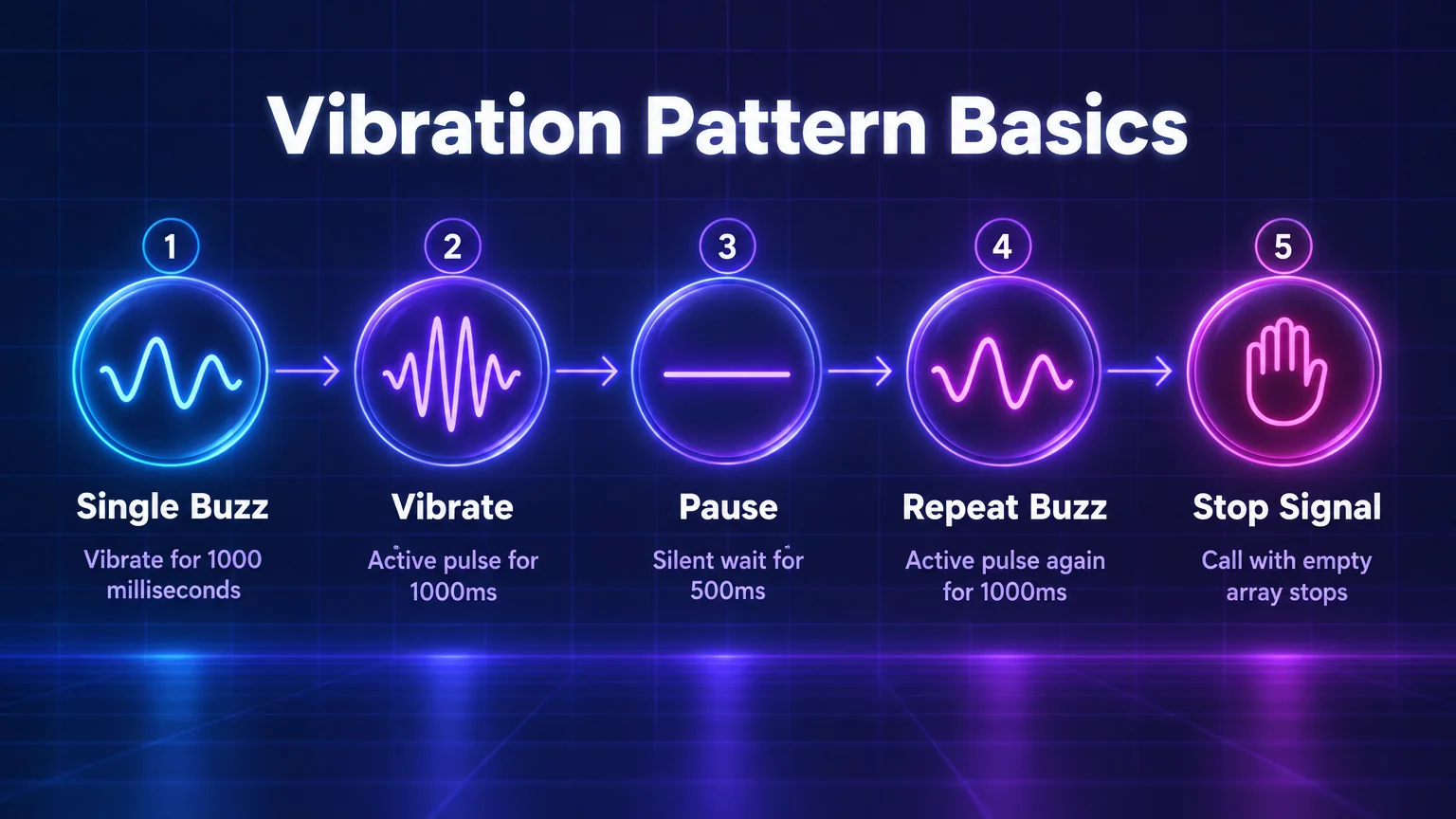
The navigator.vibrate() method accepts either a single integer (milliseconds to vibrate) or an array of integers that alternate between vibration duration and pause duration.
1. Single Vibration Pulse
Pass a single number in milliseconds, or a single-element array, to buzz the motor once:
// Vibrate continuously for 1000ms (1 second)
navigator.vibrate(1000)

// Identical behavior using an array
navigator.vibrate([1000])
2. Alternating Vibration & Pause Patterns
Pass an array of numbers where even indices (0, 2, 4...) set the active buzz duration and odd indices (1, 3, 5...) set the silent wait duration in milliseconds:
// Vibrate 1000ms -> pause 500ms -> vibrate 1000ms
navigator.vibrate([1000, 500, 1000])
3. Stopping an Active Vibration
Calling navigator.vibrate() with a new pattern immediately cancels whatever pattern is currently running. To stop all vibration right away, pass 0 or an empty array []:
// Immediately cancel any active vibration pattern
navigator.vibrate(0)
navigator.vibrate([])
Vibration also cancels automatically the moment the user switches tabs, minimizes the browser, or locks their phone screen (document.hidden === true).
Chromium's Hard Limits (VibrationController)
In Chromium's Blink source (third_party/blink/renderer/modules/vibration/vibration_controller.cc), the browser enforces three hard limits on every call:
- Maximum single pulse duration (
kMaxVibrationDurationMs):10,000ms(10 seconds). Any number above10000is clamped to10000. - Maximum pattern array length (
kMaxVibrationPatternLength):99entries. If you pass an array with 100 or more numbers, Chromium truncates it to the first 99 items. - No
Infinity: Older 2014 tutorials recommendednavigator.vibrate(Infinity). In WebIDL,unsigned longconvertsInfinityto0, which actually cancels vibration instead of running forever. To vibrate for 5 minutes (like our 5 Minutes button at the top of this page), re-trigger a9000mspulse inside asetIntervalloop while the page remains open.
How to Vibrate your Phone on the Web
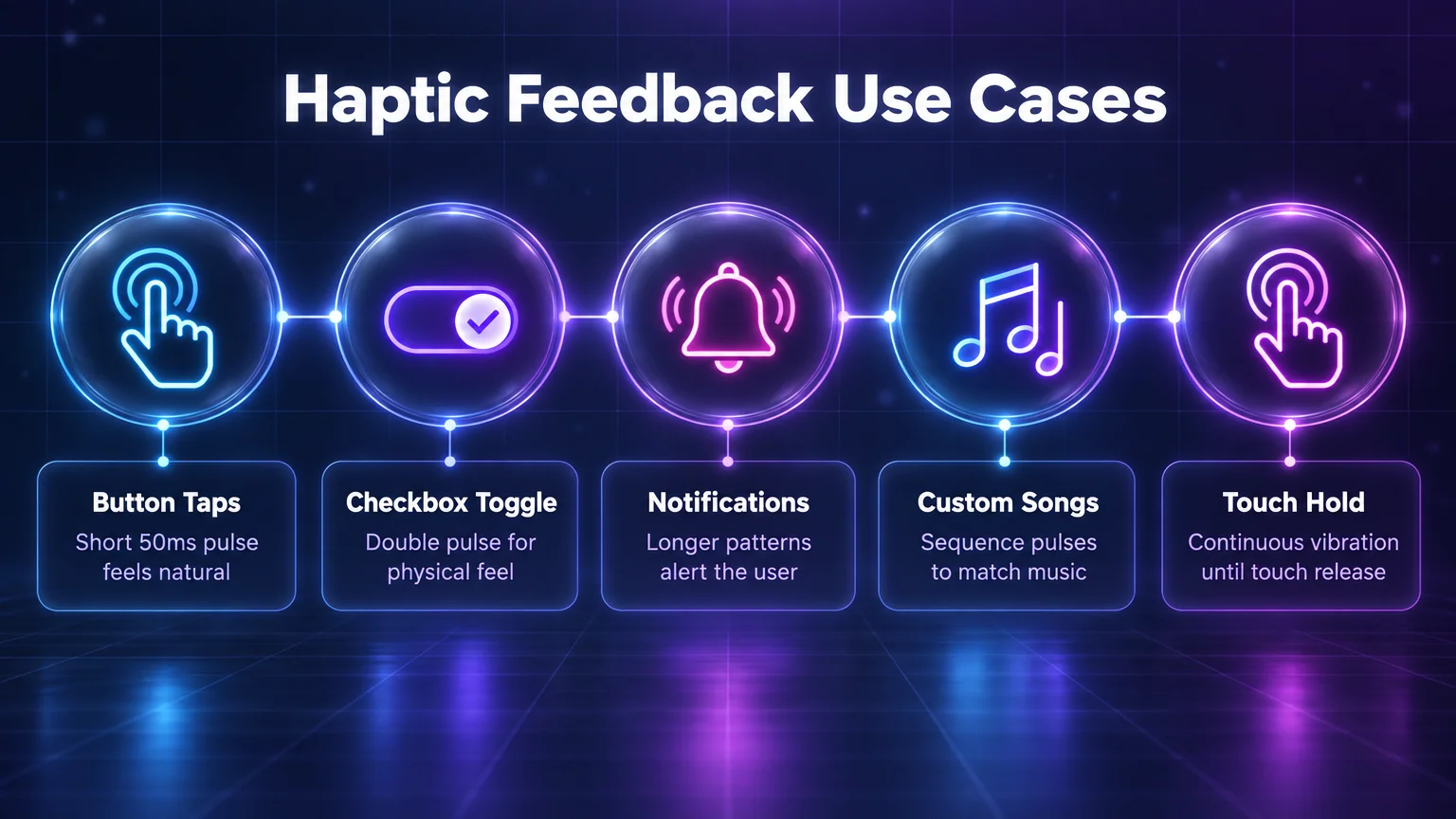
Different UI interactions call for different pulse lengths. A button tap that vibrates for 500ms feels like an incoming phone call, whereas a 20ms to 50ms pulse feels like a physical key click.
Vibration Duration Comparison (10ms to 2000ms)
Tap the buttons below on an Android phone to compare how millisecond durations feel in the hand. Anything between 10ms and 50ms works best for UI taps; 150ms and up reads as an alert or warning.
| Interaction Type | Recommended Pattern (ms) | Why It Works |
|---|---|---|
| Picker wheel / slider step | 4 to 10 | Tiny tick as each value crosses the center line |
| Primary button tap | 15 to 40 | Crisp mechanical click without buzzing the whole hand |
| Switch / checkbox toggle | [8, 120, 18] | Short initial tick, pause during thumb slide, firmer landing tick |
| Action success (save / pay) | [12, 60, 24] | Ascending double-tap that signals completion |
| Validation error / wrong PIN | [30, 50, 30, 50, 30] | Triple staccato buzz that matches a horizontal shake animation |
Press and Hold Continuous Vibration
To keep the phone vibrating for as long as the user holds a button down, listen for pointerdown and pointerup (plus pointercancel and pointerleave so the motor never gets stuck on if their finger slides off the button):
let holdTimer = null

function startHoldVibrate() {
  navigator.vibrate(10000)
  // Re-trigger before Chromium's 10-second cap expires
  holdTimer = window.setInterval(() => {
    navigator.vibrate(10000)
  }, 9500)
}

function stopHoldVibrate() {
  if (holdTimer !== null) {
    clearInterval(holdTimer)
    holdTimer = null
  }
  navigator.vibrate(0)
}

const button = document.querySelector('#hold-btn')
button?.addEventListener('pointerdown', startHoldVibrate)
button?.addEventListener('pointerup', stopHoldVibrate)
button?.addEventListener('pointercancel', stopHoldVibrate)
button?.addEventListener('pointerleave', stopHoldVibrate)
Vibrate via Toggle Switches & Checkboxes
A sliding toggle switch feels much more physical when you pair the thumb transition with a two-part pulse ([8, 120, 18]): a tiny 8ms tick when the press starts, a 120ms pause while the CSS transition slides across, and an 18ms landing pulse.
document.querySelectorAll('input[type="checkbox"]').forEach(checkbox => {
  checkbox.addEventListener('change', () => {
    navigator.vibrate?.([8, 120, 18])
  })
})
Vibrate on Async Notification or Upload Completion
Once a user taps a button on your page, Chromium grants sticky user activation to the frame. That means navigator.vibrate() will still work inside a Promise.then(), fetch completion, or progress timer after an async task finishes:
async function handleUpload() {
  // User clicked the upload button, granting sticky user activation
  await uploadFileToServer()

  // Vibrate with a double pulse when the async upload finishes
  navigator.vibrate?.([120, 80, 240])
}
Vibration with Song Patterns & Morse Code
Because navigator.vibrate() accepts up to 99 alternating on/off millisecond durations, you can tap out recognizable theme songs and Morse code rhythms. Tap any song below to play its vibration sequence:
How to Trigger Haptic Feedback on iPhone (iOS Safari)
Apple has never shipped navigator.vibrate() in Safari, and because every browser on iOS (including Chrome and Firefox for iPhone) uses WebKit, calling navigator.vibrate() on an iPhone throws TypeError: navigator.vibrate is not a function unless you guard it.
However, Safari 17.4+ (iOS 17.4 / iOS 18+) introduced a native HTML switch attribute: <input type="checkbox" switch>. Whenever a user toggles a native WebKit switch on an iPhone with System Haptics turned on, iOS fires a crisp Taptic Engine tick.
Why Old ios-haptics Libraries Broke in iOS 26.5
Between iOS 17.4 and iOS 26.4, developer libraries triggered iPhone haptics from JavaScript by creating a hidden <input type="checkbox" switch> and calling label.click() programmatically.
In May 2026 (iOS 26.5), WebKit patched that loophole so the Taptic Engine only fires when a trusted user tap directly hits the switch or its <label>. Programmatic .click() calls from JavaScript are now silent on iPhone.
The Working iOS 18+ / 26.5+ Switch Overlay Pattern
To get a real Taptic Engine tick on iPhone today alongside full navigator.vibrate() patterns on Android, place an invisible <label> wrapping <input type="checkbox" switch> inside your relative button so the user's finger taps the label directly:
'use client'

import type { ReactNode } from 'react'

export function HapticButton({
  children,
  onClick,
  pattern = 25,
}: {
  children: ReactNode
  onClick?: () => void
  pattern?: number | number[]
}) {
  return (
    <button
      className="relative inline-flex items-center justify-center rounded-xl bg-blue-600 px-4 py-2.5 font-semibold text-white"
      onClick={() => {
        // Fires on Android Chromium; safely ignored on iOS
        if (typeof navigator !== 'undefined' && typeof navigator.vibrate === 'function') {
          navigator.vibrate(pattern)
        }
        onClick?.()
      }}
      type="button"
    >
      {/* Transparent label catches the real finger tap on iOS Safari to trigger the native switch haptic */}
      <label className="absolute inset-0 cursor-pointer touch-manipulation [-webkit-tap-highlight-color:transparent]">
        <span className="sr-only">Trigger haptic</span>
        <input
          {...({ switch: '' } as Record<string, string>)}
          className="pointer-events-none invisible absolute m-0 size-px opacity-0"
          onClick={e => e.stopPropagation()}
          type="checkbox"
        />
      </label>
      {children}
    </button>
  )
}
Vibration API Code Examples
Safe TypeScript Helper (SSR & Node 21+ Compatible)
Instead of scattering raw navigator.vibrate() calls across your components, wrap the API in a small utility that checks for navigator.userActivation and catches unsupported environments cleanly:
// lib/haptics.ts
export type HapticPreset = 'light' | 'medium' | 'heavy' | 'success' | 'warning' | 'error'

const HAPTIC_PATTERNS: Record<HapticPreset, number | number[]> = {
  light: 12,
  medium: 25,
  heavy: 45,
  success: [12, 60, 24],
  warning: [20, 70, 20],
  error: [30, 50, 30, 50, 30],
}

export function vibrate(presetOrPattern: HapticPreset | number | number[] = 'light'): boolean {
  if (typeof navigator === 'undefined' || typeof navigator.vibrate !== 'function') {
    return false
  }

  // Avoid Chrome's console intervention error before the first user tap
  if ('userActivation' in navigator && !navigator.userActivation.hasBeenActive) {
    return false
  }

  const pattern =
    typeof presetOrPattern === 'string' ? HAPTIC_PATTERNS[presetOrPattern] : presetOrPattern

  try {
    return navigator.vibrate(pattern)
  } catch {
    return false
  }
}
Next.js and React Hook (useVibrate)
In React 19 and Next.js App Router, wrap the helper in a Client Component hook that exposes vibrate, stop, and isSupported:
'use client'

import { useCallback, useEffect, useState } from 'react'

export function useVibrate() {
  const [isSupported, setIsSupported] = useState(false)

  useEffect(() => {
    setIsSupported(typeof navigator !== 'undefined' && typeof navigator.vibrate === 'function')
  }, [])

  const vibrate = useCallback((pattern: number | number[] = 25) => {
    if (typeof navigator !== 'undefined' && typeof navigator.vibrate === 'function') {
      return navigator.vibrate(pattern)
    }
    return false
  }, [])

  const stop = useCallback(() => {
    if (typeof navigator !== 'undefined' && typeof navigator.vibrate === 'function') {
      navigator.vibrate(0)
    }
  }, [])

  return { isSupported, stop, vibrate }
}
Vue 3 Composable (@vueuse/core)
In Vue 3, useVibrate from @vueuse/core handles feature detection and pattern stopping out of the box:
import { useVibrate } from '@vueuse/core'

const { vibrate, stop, isSupported } = useVibrate({ pattern: [200, 100, 200] })

// Start vibrating
vibrate()

// Stop immediately
stop()
Gamepad Haptics (GamepadHapticActuator)
If you are building browser games and want to vibrate a connected Xbox, PlayStation DualSense, or Switch Pro controller on desktop or mobile, use the Gamepad HapticActuator API alongside navigator.vibrate():
async function rumbleGamepad(duration = 200, strongMagnitude = 0.8, weakMagnitude = 0.4) {
  const gamepads = navigator.getGamepads ? navigator.getGamepads() : []
  for (const pad of gamepads) {
    if (pad?.vibrationActuator) {
      await pad.vibrationActuator.playEffect('dual-rumble', {
        duration,
        startDelay: 0,
        strongMagnitude,
        weakMagnitude,
      })
    }
  }
}
Legacy jquery.vibrate.js Plugin
Back in 2014 when this post was first published, I wrote the open-source jquery.vibrate.js plugin for jQuery sites and shared a SlideShare deck on the Vibration API. If you maintain a legacy jQuery codebase, the repository and docs are still available on GitHub, though modern projects should use the zero-dependency TypeScript helper above.
Why Is My Phone Not Vibrating? (Troubleshooting)
If you tapped the Phone Vibration Test buttons at the top of this page and felt nothing, walk through these five checks to tell whether it is a browser block, an OS setting, or a dead hardware motor:
- You are on an iPhone or iPad: Apple blocks
navigator.vibrate()across all iOS browsers. To test your iPhone's physical Taptic Engine, open Settings → Sounds & Haptics, turn on System Haptics, and flip the Ring/Silent switch or tap a ringtone preview. Also check Settings → Accessibility → Touch → Vibration (if that master toggle is off, your iPhone will never vibrate, even for emergency alerts). - You are using Firefox on Android: Mozilla disabled hardware vibration in Firefox for Android in version 79 and removed the API in Firefox 129. Open this page in Chrome, Samsung Internet, Edge, or Opera on Android to run the hardware test.
- Do Not Disturb or Silent Mode is active: Many Android skins (Samsung One UI, Xiaomi HyperOS, Pixel UI) suppress web and touch haptics when Do Not Disturb or Battery Saver is turned on. Open Settings → Sound & vibration → Vibration & haptics and check that Touch feedback and Media vibration are turned on.
- Hardware diagnostic dialer codes (Android): If Chrome still does not vibrate after checking Settings, test the motor outside the browser. On Samsung Galaxy phones, open the Phone app and dial
*#0*#to open the hardware diagnostic menu, then tap Vibration. On Xiaomi/Redmi phones, dial*#*#6484#*#*. - Loose LRA/ERM connector after repair: If the native diagnostic menu also fails to vibrate, the vibration motor or flex cable is likely disconnected or worn out. This is common after screen or battery replacements.
If you are building interactive web tools or testing how mobile pages perform in search, check out my guide to the best AI website builders, my breakdown of Chrome extensions for SEO, or if you came here from the vibrator tool looking for adult AI apps, see my tested rankings of NSFW AI chatbots and AI girlfriend apps.
Frequently asked questions
How do I vibrate my phone for 5 minutes online?
Scroll to the Phone Vibration Test box at the top of this page on an Android phone (using Chrome, Samsung Internet, or Edge) and tap 5 Minutes. Because Chromium caps a single navigator.vibrate() call at 10,000 milliseconds (10 seconds), our online vibrator loops a continuous 9-second pulse with a 150ms reset until the 5-minute timer finishes or you tap Stop Vibration.
Does the Web Vibration API work on iPhones?
No. Apple has never implemented navigator.vibrate() in WebKit, so Safari, Chrome, and Firefox on iOS cannot run custom vibration durations or patterns from a website. However, on iOS 18+ you can trigger a single native Taptic Engine tick per tap by placing a transparent <label> connected to an <input type="checkbox" switch> over your buttons.
Why does navigator.vibrate() return true on desktop Chrome?
navigator.vibrate() returns a boolean indicating whether the browser accepted your parameters, not whether the device has a physical vibration motor. Desktop Chrome implements the Blink Vibration API spec and returns true once the user has clicked the page, even though desktop and laptop computers have no vibration hardware.
Why is my Android phone not vibrating during the test?
First, make sure you are using Chrome, Samsung Internet, Edge, or Opera rather than Firefox (which removed vibration support). Next, turn off Do Not Disturb and Battery Saver, then open Settings → Sound & vibration → Vibration & haptics and confirm Touch feedback is enabled. If it still does not buzz, test the hardware directly by dialing *#0*# on Samsung or checking a ringtone preview in Settings.
Can a website control vibration intensity or frequency?
No. The W3C Vibration API only turns the device's vibration motor on and off for millisecond durations; it has no intensity or waveform parameter. A newer Web Haptics API proposal (navigator.playHaptics(effect, intensity)) entered incubation at the WICG in 2026 to support named effects and intensity levels from 0 to 1, but no stable browser ships it yet.
Can an online vibration test damage my phone motor?
No. Both the browser engine (which caps single calls at 10 seconds and stops immediately when the tab closes or locks) and your phone's operating system regulate voltage to the vibration motor. Running a browser vibration test uses the exact same hardware call as an incoming phone call or alarm.