

Ahrefs' Best links filter hides backlinks that are unlikely to matter, so a report shows only the links that pass your thresholds. Ahrefs' starting thresholds are a referring domain with DR 30 or higher and traffic of 500 or more. You can change them and save the filter as your default view.
How to turn on the Best links filter
- In Site Explorer, enter a domain and open the Backlinks report.
- Open the Best links dropdown and pick Best links only.
- To change the criteria, open Best links settings at the bottom of the same menu.
- Set Default filter state to Best links only and click Save.
The menu has four options: All links, Best links only, Non-spammy links (everything except known spammy domains) and Low-quality links only (links that miss your criteria).
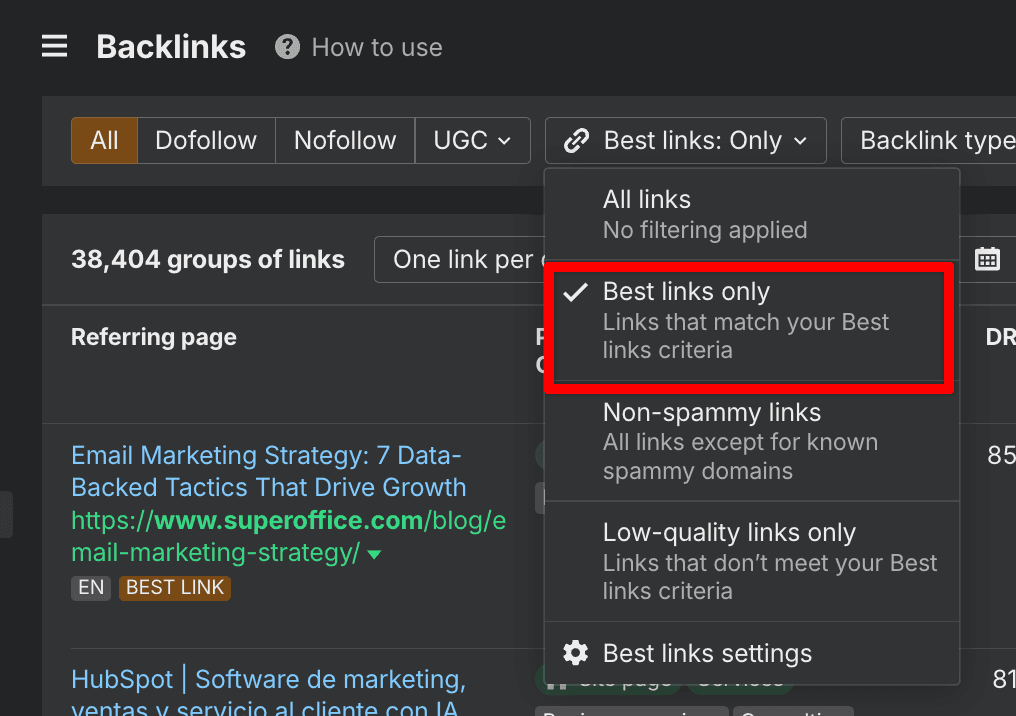
Step 2. The Best links menu in the Backlinks report, with Best links only selected.
Ahrefs' announcement names only DR 30 and traffic 500 as defaults. The other rows below are what the dialog in the screenshot shows, so check your own account.
| Setting | Value in the screenshot |
|---|---|
| Follow status | Dofollow |
| Backlink type | In content |
| Referring domain DR | 30 or higher |
| Referring domain traffic | 500 or higher |
| Exclude domains | Known spammy domains and Links from subdomains, both on |
| Referring page external links | Up to 200 |
| Default filter state | Best links only |
Follow status is one of the settings, and this dialog has it on Dofollow.
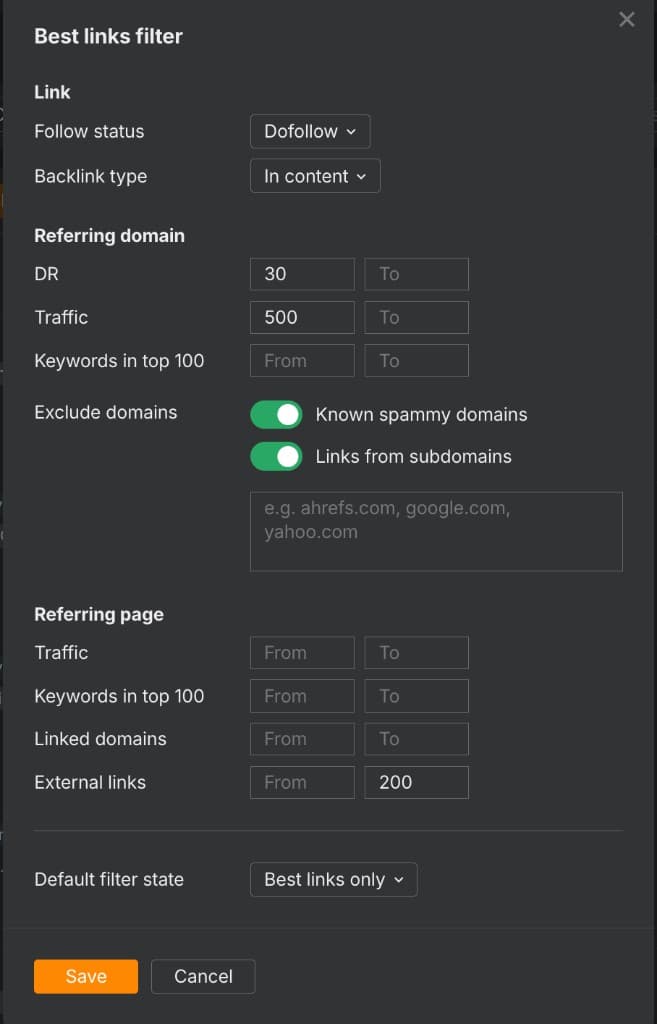
Step 3. The Best links filter dialog, with Default filter state set to Best links only.
What the filter changes (and what it does not)
The filter changes what Ahrefs shows you and tells Google nothing. Ahrefs says toggling it changes the numbers in line charts and CSV exports. The Exclude domains field takes up to 10,000 URLs and works as a soft disavow tool inside Ahrefs only.
To see only links Ahrefs tags as SPAM, turn on Known spammy domains in Best links settings, leave the other settings off, save, then pick Low-quality links only.
What makes a link worth having
DR is useful, but DR alone is how people end up buying expensive nonsense. I want to see:
- A real site with real organic traffic
- Topical relevance to your product or category
- A contextual mention inside content, with a natural anchor
- A page that is indexed and crawlable
- Few outbound links on the page
- A domain that does not exist to sell links
At LinkDr, the Best Links Only bar is DR 50-90+. If a link would not make you say "oh nice" when it appears in Ahrefs, it is probably not a best link.
Examples of best links
The links that matter are rarely random "write for us" guest posts. They are links from real articles on real domains, placed where the mention makes sense. My view is that one link from a relevant, trusted, high-traffic page can beat a pile of weak ones. That is an opinion, not a measured ratio. In these three captures from 2024, each highlighted row carries the BEST LINK badge.
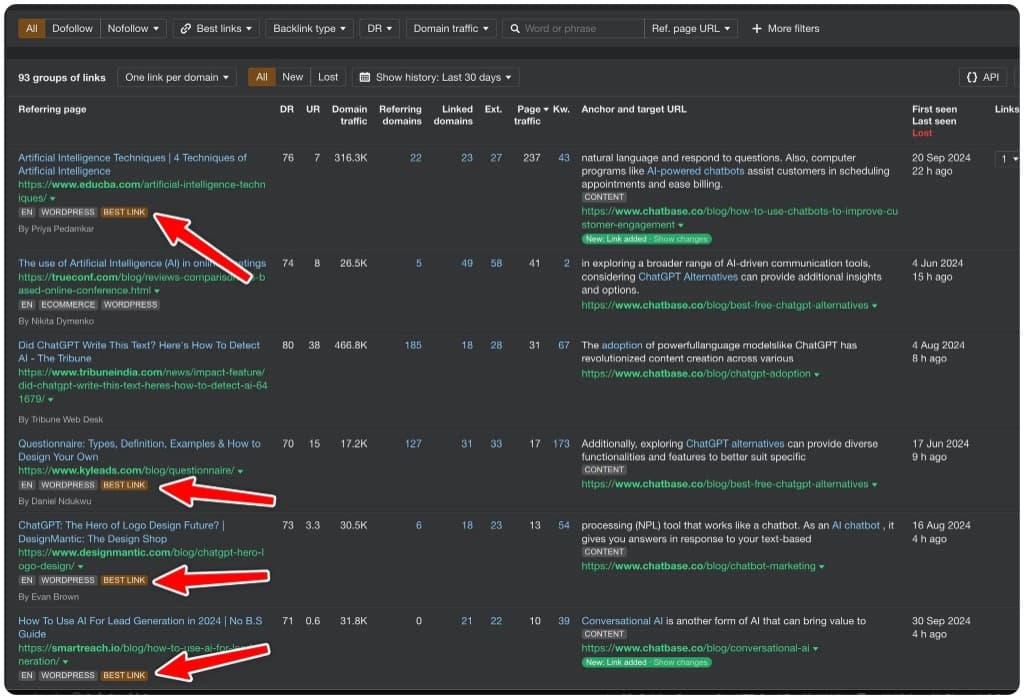
Chatbase backlinks, 2024 capture. educba.com: DR 76, domain traffic 316.3K, first seen 20 Sep 2024.
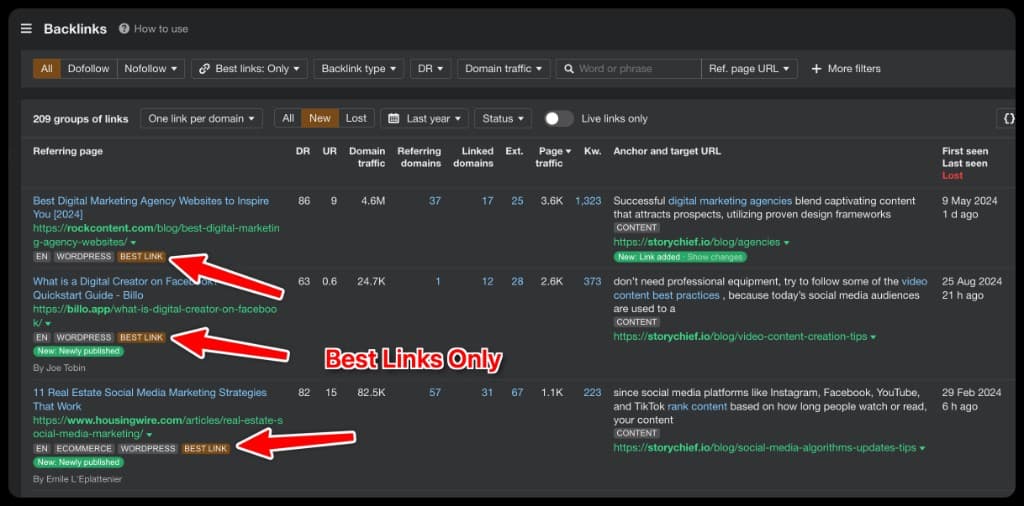
StoryChief backlinks, 2024 capture. rockcontent.com: DR 86, domain traffic 4.6M, first seen 9 May 2024.
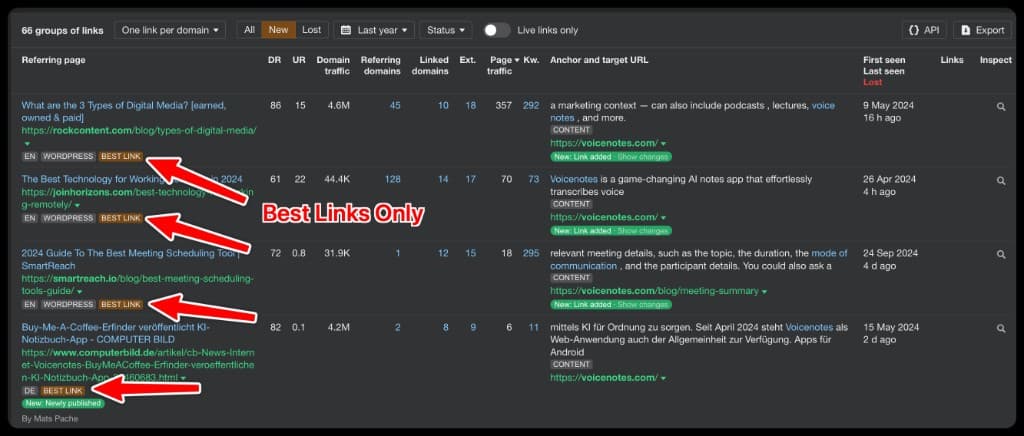
Voicenotes backlinks, 2024 capture. rockcontent.com: DR 86, domain traffic 4.6M, first seen 9 May 2024. Voicenotes is a LinkDr customer.
Best Links Only at LinkDr
LinkDr is my link-building platform. LinkDr calls Best Links Only its top 0.1% of backlinks, and its page gives no method or data behind that figure. It targets DR 50-90+ sites, has no retainer, and lists typical delivery as 3-4 weeks.

An earlier LinkDr homepage. The live headline is now "Backlinks, handled for you."
LinkDr describes the service in three steps:
- Analyze your niche.
- Curate DR 50-90+ sites with real traffic and relevance, with no junk directories and no PBNs.
- Place the link, verify it and send you the report.
The Best Links Only page shows no price of its own and sends you to LinkDr's pricing page, so this post does not say which tier applies. As of October 2026 that page prices placements per placed link by DR: $160 for DR 30+, $240 for DR 40+, $400 for DR 50+ and $500 for DR 60+. A listicle or product-review article adds 20%, and so does approving every site first. The same page lists a full refund if a link is not live within 60 days and a free replacement if it is removed within 12 months.
Who this is for
Best Links Only fits a SaaS company with decent content or landing pages, where SEO can drive serious revenue and you want fewer, better placements. It is not for you if you just want the cheapest backlinks. If you would rather run the outreach yourself, start there and use the Best links filter to check what you land.
FAQ
What is the Best links filter in Ahrefs?
A setting in the Backlinks report that hides links outside your thresholds. Ahrefs has no spam score and recommends this filter instead.
What are the default settings?
DR 30 or higher and traffic of 500 or more on the referring domain, per Ahrefs. The table above shows the other rows.
Does the Best links filter hide links from Google?
No. It changes only what Ahrefs shows you.
Is Best links the same as Best by links?
No. Best by links is a separate Ahrefs report. It lists a site's pages by how many backlinks point to them, internal and external.
Do I need Ahrefs to judge a link?
No. DR and traffic are the quick checks, and Ahrefs shows both. The 14 best SEO tools post covers other tools for checking links.
How many links do I need?
Fewer than you think, but I have no number to give you. New to this? Read link building for beginners first.
Do you guarantee rankings?
No. We control link quality, relevance and placement. Rankings also depend on your site, content, competition and technical SEO.
Does Google allow paid links?
LinkDr's pricing page says the price covers publisher payment and a contextual dofollow link. Google's spam policies list "Buying or selling links for ranking purposes" as link spam. Paid links are fine with Google only when they carry rel="nofollow" or rel="sponsored". LinkDr's service page says no junk directories and no PBNs.
Final take
Use the filter to see which links in a report clear the bar, then judge each one by traffic, relevance and placement. If you want help finding placements at DR 50-90+, see LinkDr Best Links Only.