


- Most features for the money: NoteGPT. Batch YouTube videos, playlists and channels, plus PDFs and web pages. Pro is $9.99 a month or $108 a year.
- No account, link or file: Scribiz. Free on the site without signing up. It listens when a video has no captions and can read the screen on a link. Pro is $10 a month or $84 a year.
- Free, for research across many sources: Gemini Notebook, the tool that used to be NotebookLM.
- To keep what you watched: Recall. 10 free summaries a month, then $12 a month.
- Meetings: Notta. Your own screen recordings: ScreenApp. Inside the YouTube page: Eightify.
An AI video summarizer takes a video link or file and gives you the main points, usually with chapters and timestamps, so you can decide whether the full video is worth your time. If you want to create videos from a prompt or script instead of summarizing existing ones, see my best AI video generators comparison.
There are dozens of them and most do the same thing with a YouTube link that has captions. They differ on everything else: videos with no captions, uploaded files, slides and screen recordings, how much you get for free, and what happens to the summary afterwards.
This list has 7. Disclosure: I make Scribiz, number 2 here.
How I checked: I opened each vendor's pricing page on 5 October 2026 and copied the numbers. Where a page would not load for me, the price says "reported" and names the source. I did not run a side-by-side quality test, so the order reflects what each tool covers and costs, not a score.
AI video summarizer comparison
| Tool | Best for | Free | Paid from |
|---|---|---|---|
| NoteGPT | Batches, playlists, PDFs | Yes, limits not on the pricing page | $9.99 a month or $108 a year |
| Scribiz | No account, no captions, on-screen text | 10 Listen or Watch minutes and 30 caption lookups a day | $10 a month or $84 a year |
| Gemini Notebook | Questions across many sources | Yes, with a Google account | $4.99 a month (reported) |
| Recall | A library you can search and quiz | 10 summaries a month | $12 a month, or $10 billed yearly |
| Notta | Meetings and live transcription | 120 minutes a month, 3 minutes per recording | $13.61 a month or $97.99 a year |
| ScreenApp | Recording your screen, then summarizing | 3 uploads and 2 transcriptions | $30 a month, or $19 billed yearly |
| Eightify | Summaries inside the YouTube page | Reported, a few a day | $6.99 a month (reported) |
How AI video summarizers work
A summary is only as good as what the tool read. There are three ways to read a video.
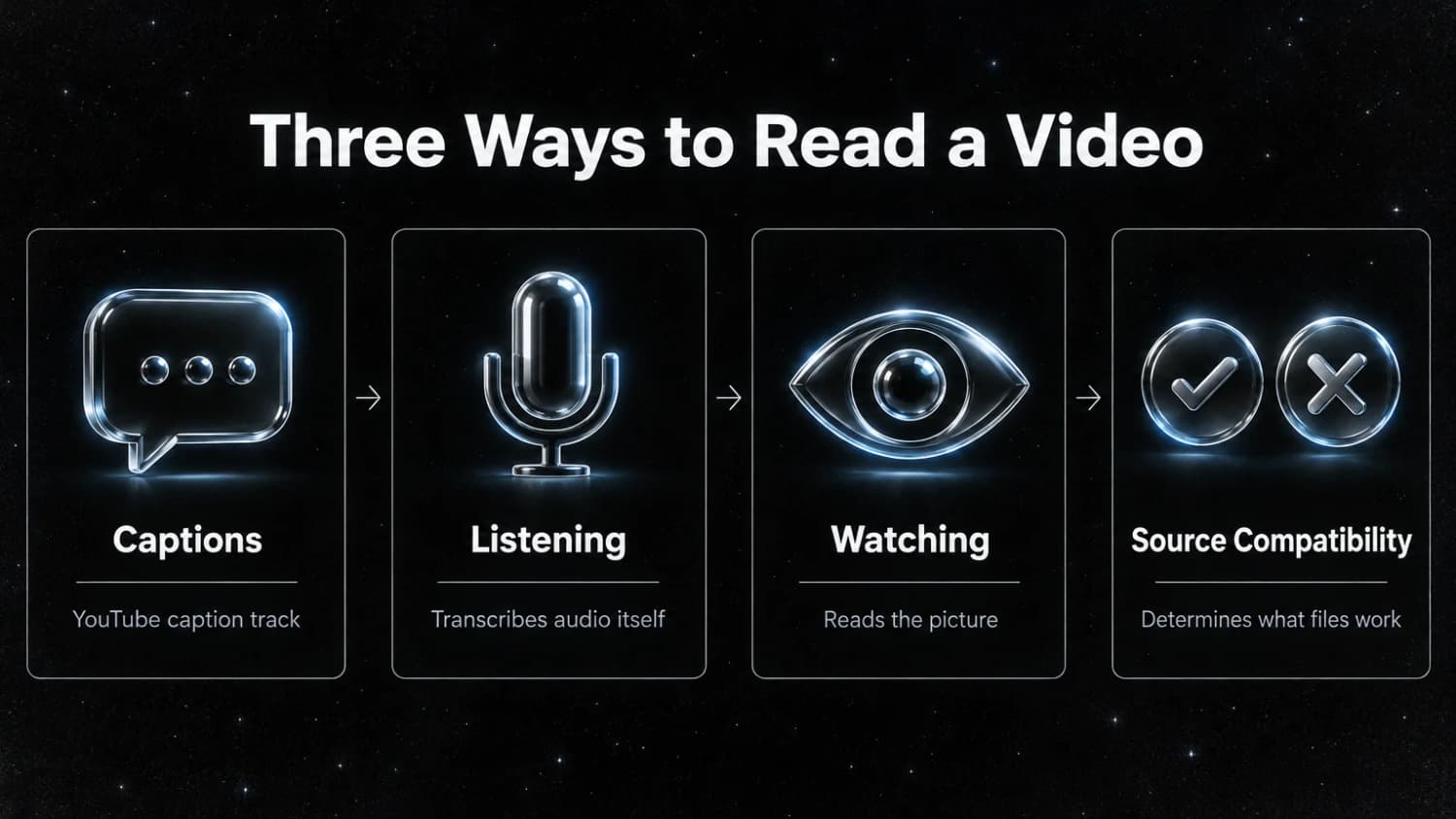
Captions. The tool fetches the caption track YouTube already has and summarizes the text. This is fast and cheap, which is why so many free tools exist. It fails when a video has no captions or bad ones.
Listening. The tool takes the audio and transcribes it. This works on files, podcasts and videos without captions. It costs the vendor more, so it is where free plans run out first.
Watching. The tool reads the picture: slides, code on screen, text in a screen recording. Few summarizers do this. Without it, a silent screen recording or a slide deck with thin narration gives the tool almost nothing to work with.
Before you pay for one, check which of the three it does for the videos you watch. A tool that only reads captions is fine for lectures and interviews on YouTube and useless for a file on your laptop.
1. NoteGPT
NoteGPT is the widest tool on this list. Its YouTube summarizer takes one link, several links or a whole playlist, and its site says a first summary needs no login. The same account also summarizes PDFs, web pages, audio files and long text, and makes slides and mind maps from the result.
Paid plans raise how much runs at once. Pro handles 5 YouTube videos at a time and 2 channels. For a YouTube video with no subtitles the Pro cap is 120 minutes per video, and the two higher plans go to 210 minutes. Local files go up to 1 GB on Pro.
Where it beats Scribiz: batches, playlists and channels, and everything that is not a video. If you want one subscription for videos, PDFs and articles, this is the one.
Where it is weaker: the plans mix "basic quotas" and "premium credits" (Pro has 1,000 and 100 a month), so it takes some reading to know what a long video without subtitles will cost you. The pricing page does not state the free plan's limits.
Pricing: Pro is $9.99 a month or $108 a year. The middle plan is $29 a month or $239 a year. Max is $99 a month or $829 a year. The page labelled the yearly prices a limited-time 30% saving when I checked on 5 October 2026.
2. Scribiz
Scribiz takes a link or a file and returns a one-sentence summary, key points, chapters and quotes, each tied to a timestamp. The web tool is free and needs no account.
It uses captions when a video has them. When it does not, it listens to the audio. On a link it can also read the screen, which is what makes slides and screen recordings summarizable. YouTube, direct audio and video links, podcast episodes and uploaded files are the reliable sources. TikTok, Instagram, X, Vimeo and Facebook are best effort, because those sites block requests. Spotify, Netflix, private videos and live streams do not work.
Besides the web tool there is a Mac app (version 0.1.2, for Apple silicon Macs on macOS 14 or later, on the download page), a command-line tool, and an MCP server at https://scribiz.com/mcp so an AI agent can read a video for you:
claude mcp add --transport http scribiz https://scribiz.com/mcpWhere it is weaker than the rest of this list. The web tool takes one video at a time and there is no playlist or channel input (the command-line tool can run a folder of files), so NoteGPT is better for playlists. It keeps a result for 24 hours, or 30 days with an account, so Recall and Gemini Notebook are better if you want a library. It has no meeting bot, so Notta wins for calls. A file in the browser is capped at 100 MB and about 50 minutes of audio, and uploaded files get listening only, not screen reading. When YouTube blocks the audio download, a model reads the link instead and timestamps can be off by two to three seconds.
Free: without an account, videos up to 15 minutes, 10 Listen or Watch minutes a day and 30 caption lookups a day. A free account adds 30 minutes a month.
Pricing: Pro is $10 a month or $84 a year for 600 minutes a month, videos up to 6 hours and questions about a video. A caption summary uses a tenth of a minute per minute of video, listening uses one, and listening plus screen uses two. Minute packs that do not expire cost $5 for 300 minutes, $25 for 2,000 or $100 for 10,000.
Summarize a video with Scribiz3. Gemini Notebook
Gemini Notebook is Google's research notebook, known as NotebookLM until the rename in July 2026. You add sources to a notebook, YouTube links among them, and ask questions that it answers with citations back to the source.
Where it beats Scribiz: more than one source. Put five lectures, the course PDF and your notes in one notebook and ask a question across all of them. No other tool on this list does that as well, and the free plan is large. Guides updated this month report 100 notebooks with 50 sources each on a free Google account.
Where it is weaker: it is a notebook, so there are more steps than pasting a link and reading the result. YouTube sources are reported to work only for public videos that have captions. I could not find a Google page that states the limit on video length.
Pricing: free with a Google account. More capacity comes with Google's AI plans, reported at $4.99 a month for Google AI Plus and $19.99 a month for Google AI Pro in the US. Google's plans page showed me a localized version without US prices, so treat both numbers as reported.
4. Recall
Recall summarizes YouTube videos, podcasts, articles and PDFs, then files each summary into a personal knowledge base. It links related items for you, lets you chat with everything you saved, and can quiz you on it later with spaced repetition.
Where it beats Scribiz: what happens after the summary. Scribiz hands you the result and is done. Recall keeps it, connects it to what you saved last month, and reminds you of it. If your problem is that you forget what you watched, pick Recall.
Where it is weaker: you need an account, and the free plan stops at 10 AI summaries a month. The automatic linking, chat and quizzes are on the paid plans.
Pricing: Free includes 10 AI summaries a month and API and MCP access. Plus is $12 a month, or $10 a month billed yearly, and removes the cap on summaries. Max is $38 a month billed yearly and lets you choose the model.
5. Notta
Notta is a meeting note-taker that also summarizes video. It transcribes audio files, video files and YouTube links, and it records Zoom, Google Meet, Microsoft Teams and Webex calls, with a bot or without one.
Where it beats Scribiz: meetings. It joins the call, transcribes live, translates in real time and writes the action items. It lists SOC 2, ISO 27001, GDPR and HIPAA on its site, which matters if a company is paying. Scribiz does none of that.
Where it is weaker: the free plan transcribes 120 minutes a month but only 3 minutes per recording, so you cannot judge it on a real video without paying. AI summaries are counted separately, 10 a month on Free and 100 on Pro.
Pricing: Pro showed as $13.61 a month, or $97.99 a year ($8.17 a month), with 1,800 minutes a month and recordings up to 5 hours. Business showed as $27.78 a month or $199.99 a year. Those odd numbers look converted from another currency, so your page may show a rounder price.
6. ScreenApp
ScreenApp starts one step earlier than the others. It records your screen or your meeting, then transcribes the recording and turns it into notes. It also takes uploads and YouTube links.
Where it beats Scribiz: recording. If the video does not exist yet, because it is a call or a walkthrough you are about to give, ScreenApp captures and summarizes it in one place.
Where it is weaker: price, and a small free plan. Free gives you 3 uploads and 2 transcriptions to try, with recordings up to 45 minutes. Pro allows 50 transcriptions a month.
Pricing: Pro is $30 a month, or $19 a month billed yearly ($228 a year) after a 7-day trial that needs a card. Max is $69 a month, or $34 a month billed yearly, with no monthly cap on uploads or transcriptions.
7. Eightify
Eightify is a browser extension that puts a summary next to the YouTube video you are watching. You do not copy a link or open another tab.
Where it beats Scribiz: it is already on the page. For someone who watches a lot of YouTube and wants a summary one click away on every video, an extension beats a website.
Where it is weaker: it is reported to work on YouTube only, so files and other sites are out.
Pricing: reported. Eightify's site blocked my requests, so I could not read its pricing page. TechBriefly's listing, updated in September 2026, gives $6.99 a month or $49.99 a year. Other reviews from this year list $9.99 a month. Check the extension's own page before you pay.
Free AI video summarizers
All seven have a free way in. What you get differs a lot.
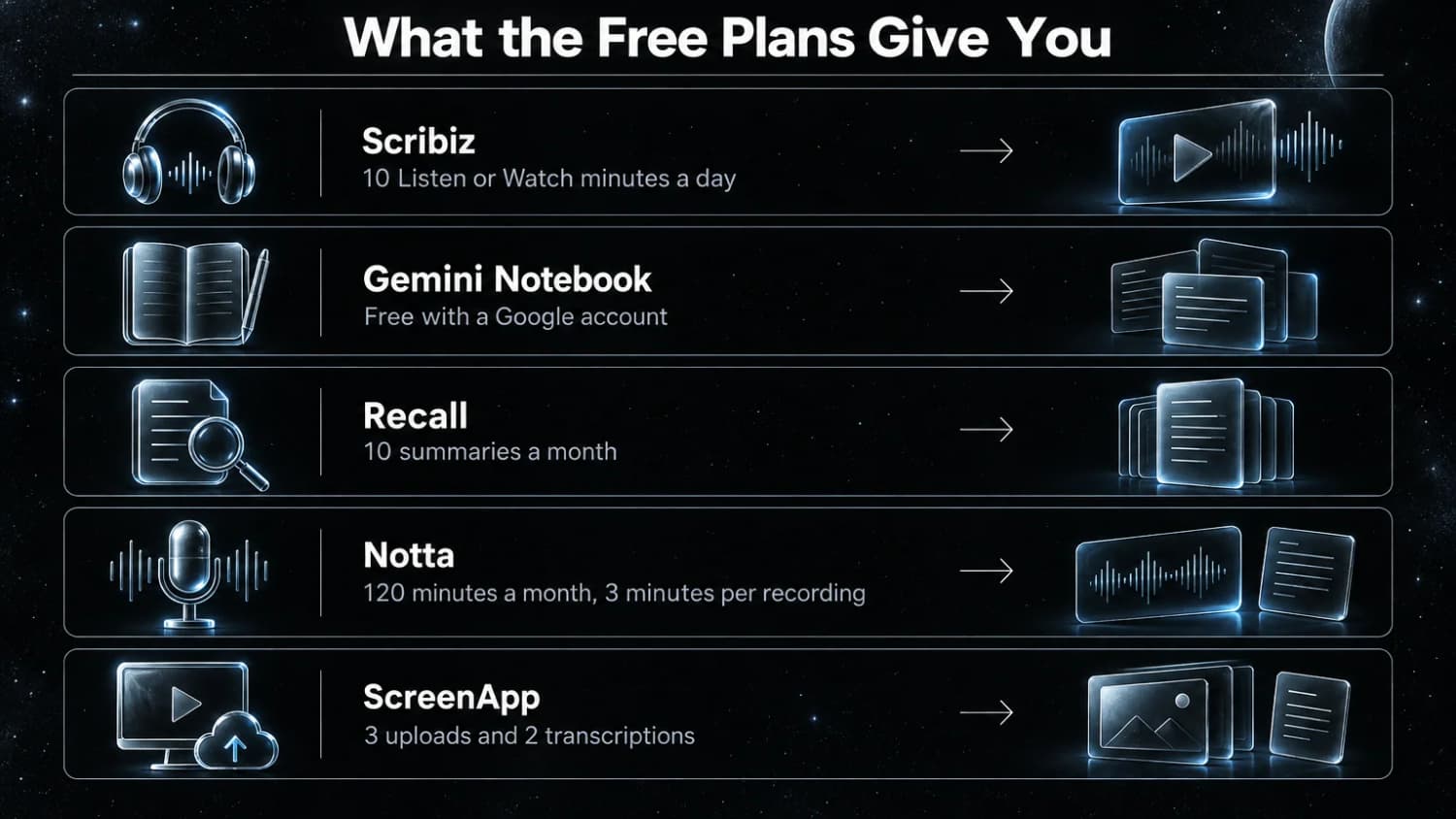
- No signup: Scribiz gives 10 Listen or Watch minutes and 30 caption lookups a day on videos up to 15 minutes. NoteGPT's site says its YouTube summarizer also works without a login.
- Free with an account: Gemini Notebook is free on a Google account. Recall gives 10 summaries a month.
- Free to try, not to use: Notta's 3-minute cap per recording and ScreenApp's 2 transcriptions are trials.
A caption-based summary of a YouTube video is cheap for the vendor, so it is the part you will find free almost everywhere. Listening to a file with no captions is where the free minutes go.
Which one to pick
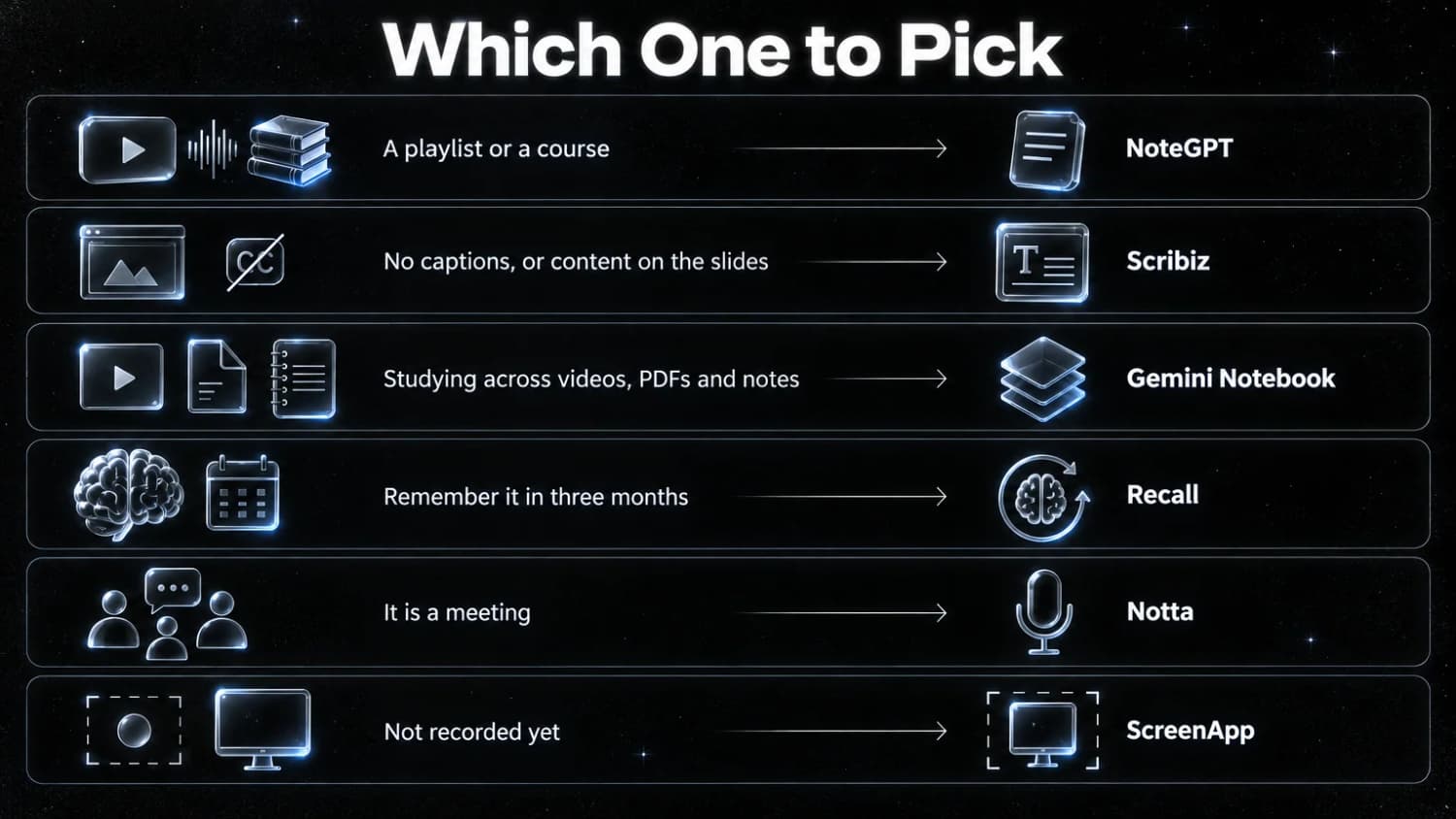
- You watch one video and want the points now: Scribiz or NoteGPT. Neither needs an account for the first one.
- You have a playlist or a course to get through: NoteGPT.
- The video has no captions, or the content is on the slides: Scribiz.
- You are studying a topic across videos, PDFs and notes: Gemini Notebook.
- You want to remember it in three months: Recall.
- It is a meeting: Notta.
- You have not recorded it yet: ScreenApp.
- You live on YouTube: Eightify.
FAQ
Is there a free AI video summarizer?
Yes. Scribiz and NoteGPT summarize a video without an account, Gemini Notebook is free with a Google account, and Recall gives 10 summaries a month. The limits are in the free section.
Can an AI summarize a video that has no captions?
Yes, if the tool transcribes the audio itself. Scribiz does. NoteGPT does on paid plans, up to 120 minutes per video on Pro. Notta and ScreenApp do, because transcription is their main job. Gemini Notebook is reported to need captions on YouTube sources.
How long a video can these tools take?
It depends on the plan. Scribiz takes 15 minutes without an account and 6 hours on Pro. NoteGPT Pro takes 120 minutes for a YouTube video without subtitles. Notta Pro takes recordings up to 5 hours. ScreenApp Pro records up to 2 hours.
Are the timestamps accurate?
They are as accurate as the transcript behind them. When a tool has the audio and word timings, a timestamp lands on the sentence. When a model reads a link without the audio, expect it to be off by a couple of seconds. On Scribiz that second case is marked as approximate in the result.
Can an AI agent summarize a video for me?
Yes, through MCP. Scribiz has a server at https://scribiz.com/mcp that Claude Code and other MCP clients can call, and Recall includes API and MCP access on its free plan.