

Churn is where founder cope goes to die.
Acquisition problems are comforting. You can blame ads, SEO, a quiet launch, your landing page, the market, Mercury in retrograde, whatever. Churn is uglier because someone already tried the thing. They got inside. They saw the product. Then they decided: nah.
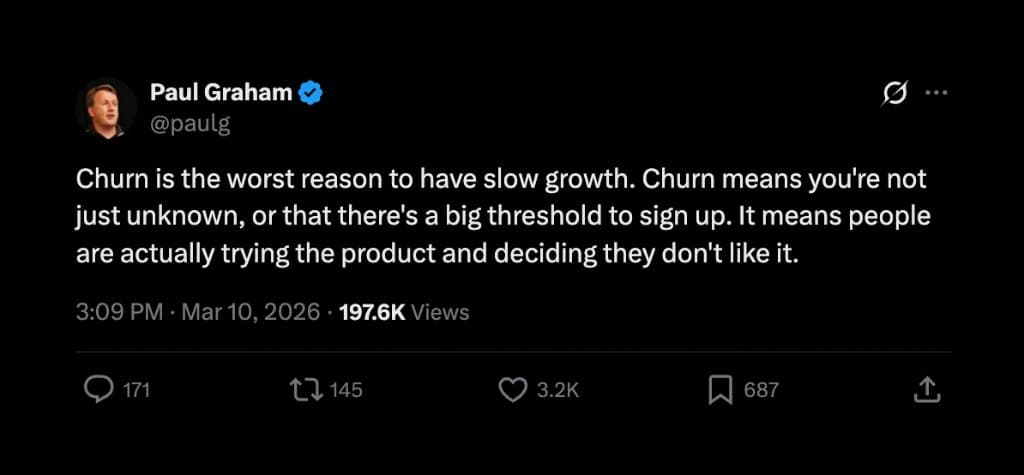
That is why churn hits harder than low traffic. Low traffic says people do not know you exist. Churn says your promise did not survive contact with reality.
This post is not a cute list of "send a newsletter" tips. Those help, sometimes. But if your product is leaky, newsletters are just scented candles on a house fire.
The goal is simpler: keep the customers who should stay, learn from the ones who leave, and stop counting fake wins.
- Churn is not one metric. Segment it by customer type, plan, channel, cohort, and cancellation reason.
- The biggest churn fix is usually product quality, not a clever cancellation popup.
- Onboarding should get users to one real result fast, not tour them through every feature.
- A cancellation flow should create clarity and save confused users, not trap people.
- Small churn changes compound. A few points can be the difference between a SaaS and a treadmill.
If you want help turning more of your traffic into customers before they churn, I build and grow SaaS products at MagicSpace SEO. If you need to make the churn story clear in a deck, GenPPT turns rough notes into investor-ready presentations without the usual slide goblin work.
First: stop treating churn like one number
"Our churn is 8%." Cool. What kind?
A cancellation because someone wanted a free plan is not the same as a cancellation because your product ate their data. A user leaving because their project ended is not the same as a user leaving because onboarding made them feel stupid.
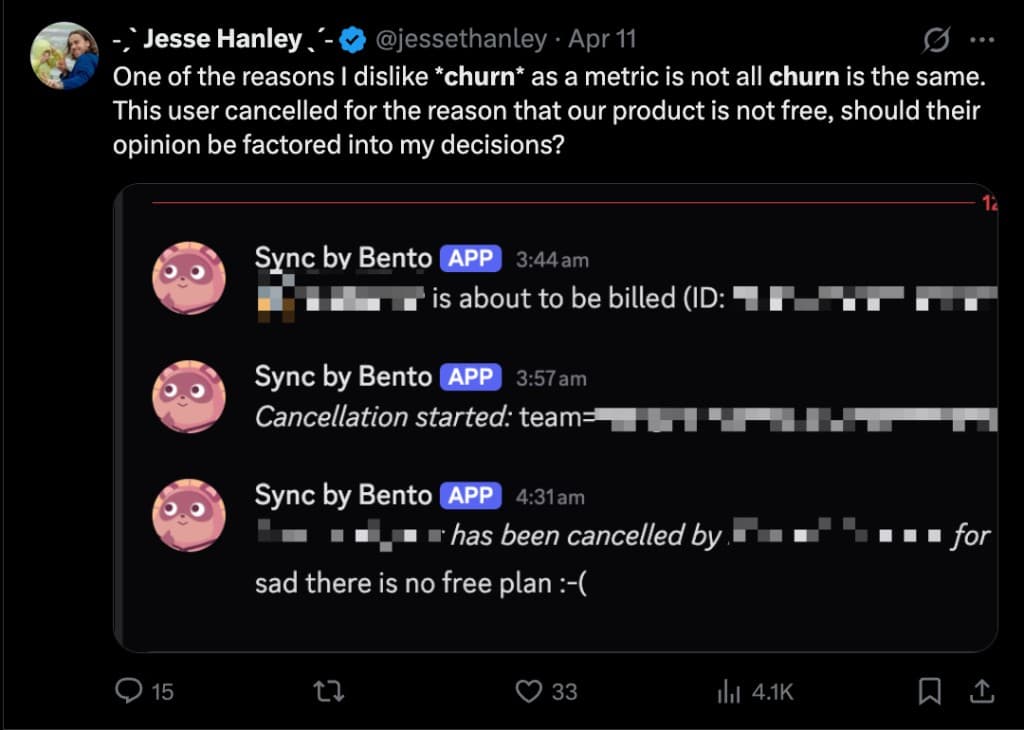
Before you "fix churn," split it.
Useful cuts:
- Voluntary churn: They chose to cancel.
- Involuntary churn: Card failed, payment issue, billing problem.
- Bad-fit churn: They never matched the customer you actually serve.
- Activation churn: They never reached the first meaningful result.
- Value churn: They used the product, understood it, and still did not get enough value.
- Success churn: Their project ended, they hired someone, or the job disappeared.
Most founders mix these together, then build the wrong fix.
If people churn because they cannot connect Stripe, improve setup. If they churn because they do not want to pay, improve qualification. If they churn because the product is buggy, stop shipping more menu items and fix the kitchen.
1. Fix the product before you fix the funnel
This is the boring answer, which is annoying because it is also the real one.
People churn when the value they get is lower than the cost they feel. Cost is not just price. It is setup time, switching pain, bugs, confusion, embarrassment in front of their team, and the tiny dread of opening your app again.
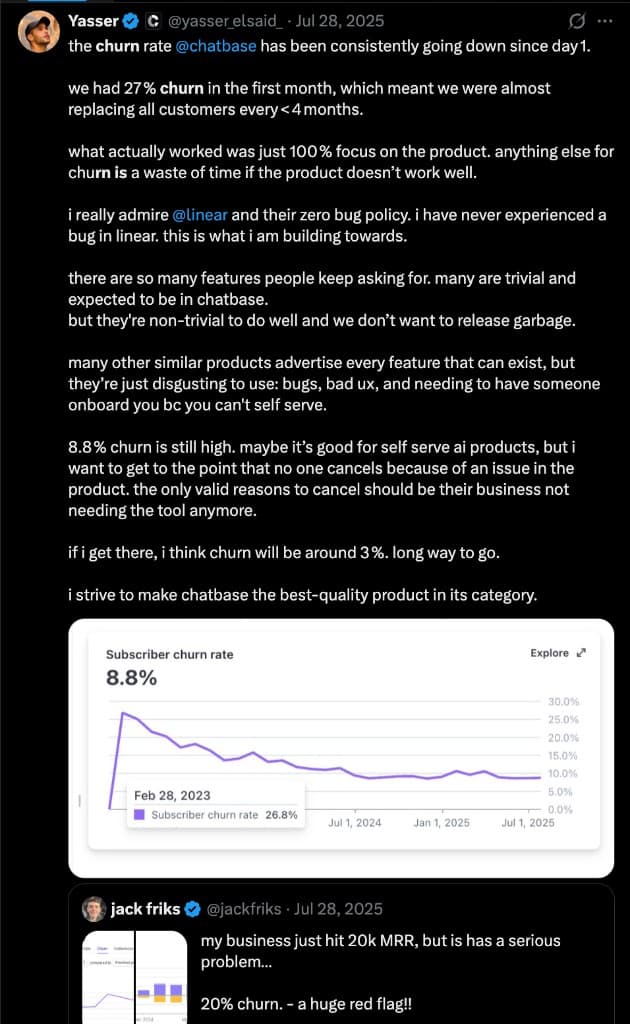
Yasser from Chatbase has been very public about this. Chatbase is a MagicSpace SEO client, and one thing I respect about their approach is the obsession with quality over feature confetti.
The tempting founder move is to add more.
More features. More onboarding emails. More discounts. More AI. More tabs. More "quick wins" that quietly make the product heavier.
But churn often drops when you remove the reasons people feel betrayed:
- The core job works every time.
- The first result happens fast.
- The product does not make users ask support for basic things.
- The docs answer the top 20 confused-user questions.
- The UI uses the words customers use, not the words your database uses.
- Bugs that block value get fixed before new shiny features ship.
For GenPPT, the retention question is not "How many export formats can we add?" It is: can a founder paste rough notes and walk away with a deck they would actually send to a customer, investor, or team? If that core promise fails, a fancy template gallery will not save churn.
2. Measure churn correctly or you will celebrate nonsense
Churn dashboards can lie in a very polite font.
One founder in the screenshots dropped churn by changing the billing definition from counting trials as active to counting subscriptions after the first payment. That is not a product breakthrough. It is a measurement cleanup. Still useful, but different.
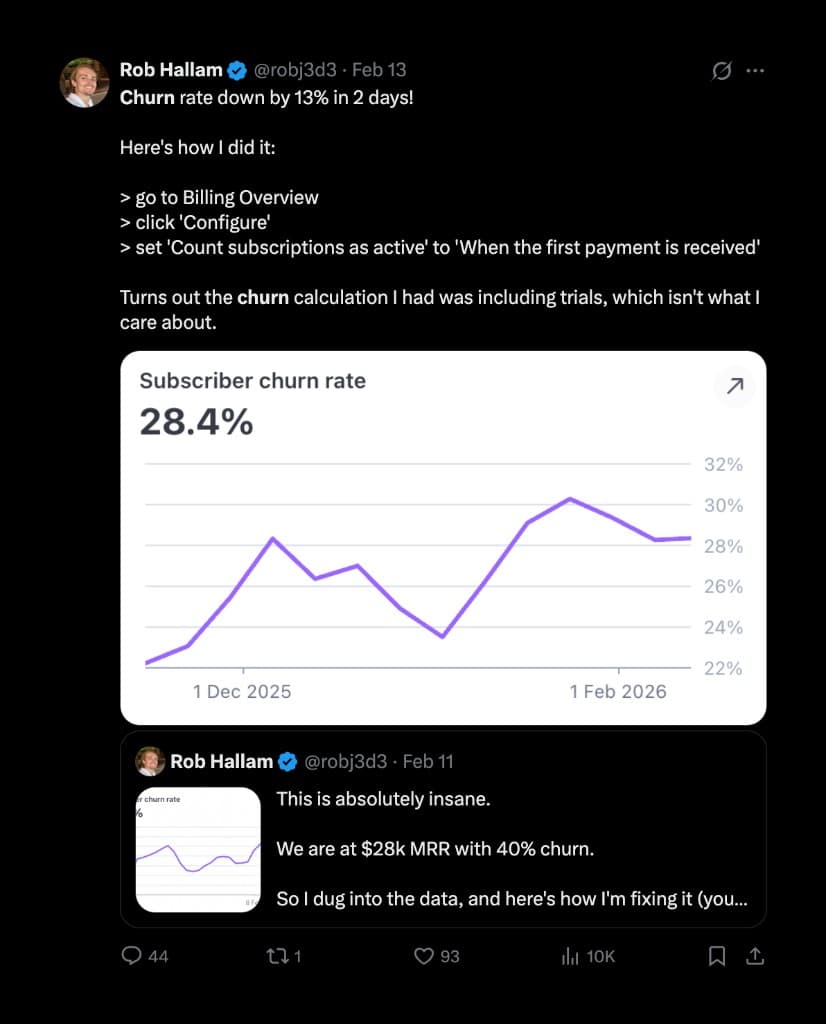
Track at least these separately:
- Logo churn: percentage of customers lost.
- Revenue churn: percentage of recurring revenue lost.
- Net revenue retention: expansion minus contraction and churn.
- Trial-to-paid dropoff: not churn, but often confused with it.
- Cohort retention: what happens to customers who joined in the same month.
- Plan-level churn: cheap monthly plans usually behave very differently from annual or team plans.
The fastest sanity check: do not mix free trials, failed payments, one-off users, and serious customers into the same emotional spreadsheet.
A 20% churn rate on impulse B2C users is not the same business problem as 20% churn on $500/month B2B accounts.
3. Shorten time to value until it feels almost rude
Onboarding is not a museum tour. Nobody needs to see every room.
Good onboarding gets the user to the first real outcome with as few choices as possible. That outcome depends on the product:
- A presentation tool: first usable deck.
- An SEO product: first ranked opportunity or audit insight.
- A support tool: first resolved conversation.
- An analytics tool: first moment where the founder says, "Oh, that is why revenue moved."
The rule is pretty simple: if the product is simple, make onboarding self-serve. If it is high-ticket or complex, get people on a call.
But do not confuse "call" with "customer success theater." The call should complete setup, remove blockers, and make the next action obvious.
A strong first 14 days might look like this:
- Day 0: Welcome email with one login link, one goal, one 5-minute setup path.
- Day 1: Help them complete the core action. No newsletter essay.
- Day 3: Show one advanced use case based on what they already did.
- Day 5: Ask if they got the promised result. Plain reply-to email.
- Day 7: Send a value recap: what they created, saved, launched, fixed, or learned.
- Day 14: Invite them to upgrade usage, bring a teammate, or book help if they stalled.
The email sequence should not be "feature drip." It should be a guided shove toward the thing they came for.
If someone signs up for GenPPT because they need a sales deck, the early flow should not teach them the history of presentation design. It should get them from messy notes to a credible deck before they open Canva out of panic.
4. Watch behavior before cancellation day
By the time someone clicks cancel, they have usually been gone for a while.
The warning signs show up earlier:
- They never complete the setup step.
- They log in twice, then disappear.
- They use only one feature and ignore the rest of the value path.
- They hit docs repeatedly for the same topic.
- They open support tickets with frustration words: "again," "still," "why," "broken."
- Their usage drops after a failed export, failed integration, or confusing billing moment.
You do not need machine learning to start. A few blunt rules are enough:
- No login for 3 days during trial? Send a human-looking check-in.
- Created zero projects by day 2? Trigger setup help.
- Hit the same error twice? Route to support before they ask.
- Viewed billing page three times? Offer plan help or annual savings.
- Heavy usage but no upgrade? Show the ROI or next limit clearly.
Session tools like Hotjar, Microsoft Clarity, and PostHog can help, but the point is not surveillance for its own sake. The point is to find the moment where the product made someone feel dumb, blocked, or doubtful.
Imagine watching ten trial users hit the same "connect workspace" screen, pause, open docs, close the tab, and never return. That is not a marketing problem. That is a tiny product crime scene.
Then fix that moment.
5. Make the product sticky without being evil
Sticky does not mean hostage-taking.
Bad sticky: "Call us between 8:00 and 8:12 on alternate Tuesdays to cancel."
Good sticky: the product becomes part of the customer's workflow because it stores work, automates something painful, connects to their team, or produces ongoing value that stops when they leave.
Examples:
- Email marketing software is sticky because flows, lists, segments, and revenue reporting pile up over time.
- A CRM is sticky because switching means moving context, notes, tasks, and habits.
- An SEO tracker is sticky because historical rankings and alerts matter more the longer it runs.
- A deck product can be sticky if teams build a living library of pitch decks, sales decks, reports, and brand-safe templates.
Ask: what would hurt to lose because it is genuinely useful, not because you hid the export button?
For SaaS, sticky features often come from saved context:
- history
- automations
- team workflows
- integrations
- trained preferences
- recurring reports
- shared libraries
- benchmarks over time
If canceling your product changes nothing about the customer's week, churn will stay high.
6. Build a cancellation flow that saves confusion, not prisoners
The worst cancellation flow is one-click instant cancel with zero learning.
The second-worst is a dark-pattern maze that makes people hate you and post screenshots.
The useful middle:
- User clicks cancel.
- You ask the main reason with honest options.
- If the reason is confusion, missing setup, bug, or price, offer the right path.
- If they still want to cancel, let them cancel.
- After cancellation, send a short win-back or feedback email based on the reason.
Cancellation reasons worth collecting:
- Too expensive
- Missing feature
- Product was confusing
- Bug or quality issue
- Switched to competitor
- No longer need it
- Project ended
- Wanted free plan
- Other, with a required comment if they choose it
The comment matters. Multiple-choice tells you the category. The sentence tells you the actual problem.
There is a huge difference between "too expensive" and "too expensive because I only needed one deck." One is a pricing signal. The other is a packaging signal. Treat them the same and you end up discounting when you should have sold a one-off credit pack.
Do not overreact to one angry note. Do react when ten people say the same thing in boringly similar words.
7. Talk to customers before they become archeology
"Communicate regularly with customers" sounds like LinkedIn soup, but the useful version is simple: make it easy for real users to tell you where the product is leaking.
You can do this without turning into an enterprise customer-success circus.
Lightweight options:
- A monthly founder email with one question: "What almost made you cancel this month?"
- A Slack or Discord for power users, not every random trial user.
- Office hours once a month.
- A 15-minute rescue call offered only to high-intent accounts.
- A public changelog that says what got fixed because users complained.
- A tiny "Was this confusing?" prompt on docs and empty states.
Support tickets are not just work. They are churn research written by people who cared enough to complain instead of silently leave.
The trick is to close the loop. If five users report the same confusing thing and you fix it, tell them. People stick around when they feel the product is getting sharper around their pain.
8. Use community carefully
Community can reduce churn. It can also become a loud room full of non-buyers asking for free consulting.
Use it when customers need:
- examples from other users
- accountability
- implementation help
- peer benchmarks
- templates
- office hours
- motivation to keep going
Do not use community as a substitute for product clarity.
If users need a Discord to understand your app, your app is not community-led. It is confusing.
A good community is a gym class: people show up because the product works better with examples, momentum, and other people nearby. A bad community is the front desk for a broken hotel: everyone is there because their key card does not work.
9. Price for commitment, not maximum signups
Cheap plans attract experimenters. That is not always bad, but be honest about what you are buying.
A $9 plan may create volume and feedback. It may also fill support with users who evaluate you like a free Chrome extension.
Higher prices can reduce churn because they attract people with a real problem, budget, and urgency. They also raise expectations. You do not get to charge B2B prices and ship toy onboarding.
A decent pricing audit:
- Which plan has the worst churn?
- Which acquisition channel brings the worst churn?
- Which plan creates the most support tickets per dollar?
- Which customers expand over time?
- Which customers complain about price before seeing value?
Sometimes the churn fix is not a discount. It is removing the plan that invites the wrong customer.
Think of pricing like a bouncer, not just a cashier. The wrong low price lets in people who want to browse, complain, and leave. The right price lets in people with an actual job to do.
10. Send value recaps, not "we miss you" emails
"We miss you" emails are usually brand sadness in HTML.
Send proof instead.
A good value recap says:
- You created 12 decks this month.
- Your team saved 6 hours of editing.
- You ranked for 18 more keywords.
- You resolved 320 support chats.
- Your competitor changed pricing twice.
- Your campaign generated 43 trials.
People renew what they remember.
If your product creates value quietly in the background, surface it. Otherwise the customer only feels the invoice.
This is why bookkeeping software sends clean monthly summaries. Nobody wakes up emotionally attached to reconciled transactions. But "you categorized $48,200 in expenses and found $3,100 in deductions" makes the invisible work feel real.
11. Learn from Chatbase: churn down is a product sport
This screenshot is the good kind of founder dopamine.
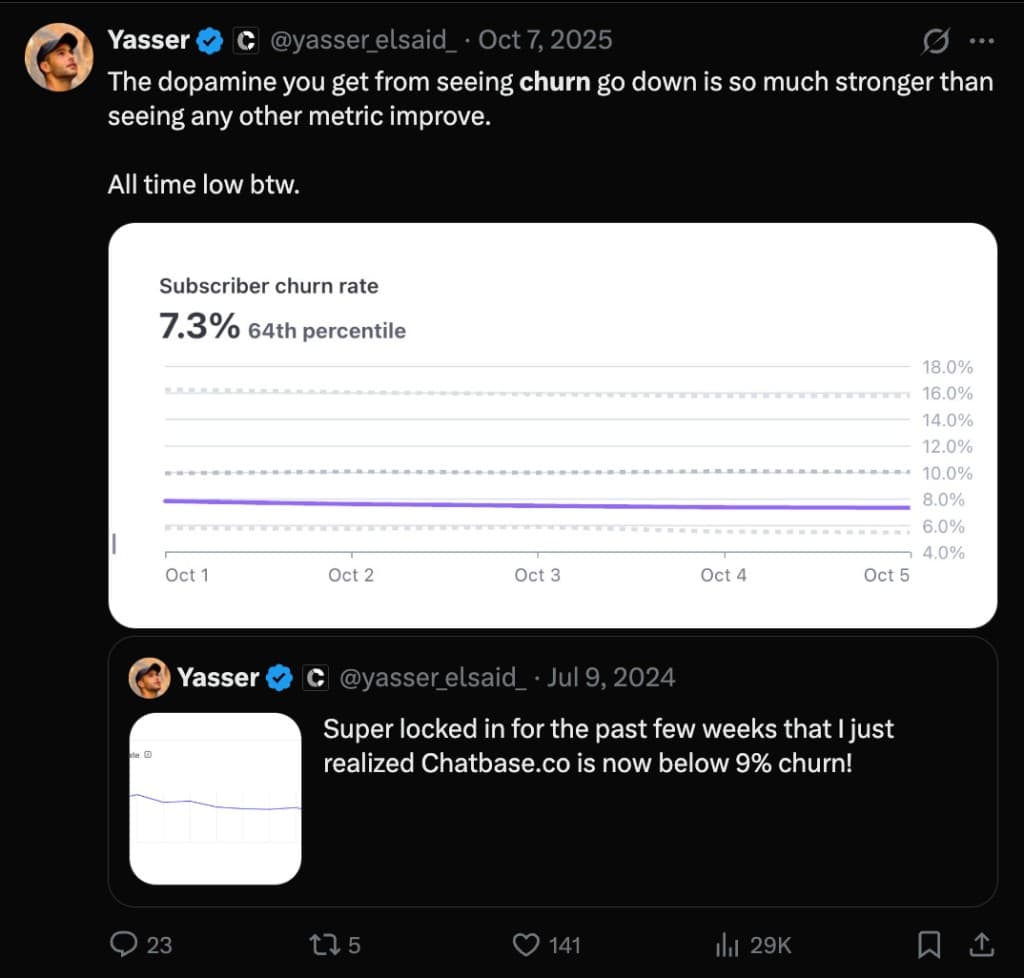
The important part is not just the number. It is the posture: measure it, talk about it, keep improving the product, and do not pretend one trick fixed everything.
The boring compounders are usually what move churn:
- fewer bugs
- clearer setup
- better docs
- stronger activation
- smarter pricing
- human save calls for valuable accounts
- cancellation feedback that actually reaches product decisions
- product promises that match product reality
No magic sauce. Just fewer reasons to leave.
The 30-day churn cleanup plan
If your churn is ugly, do this before hiring a retention consultant with a 47-slide framework.
Week 1: clean the measurement
- Separate trial dropoff from paid churn.
- Split churn by plan, acquisition channel, and customer segment.
- Pull the last 50 cancellation comments.
- Tag each as fit, activation, value, price, bug, support, project ended, or other.
Week 2: fix activation
- Define the one action that predicts retention.
- Rewrite onboarding around that action.
- Remove every step that does not help users reach it.
- Send a day-3 rescue email to users who have not completed it.
Week 3: repair cancellation
- Add cancellation reasons if you do not have them.
- Offer a save path only when it matches the reason.
- Route high-value confused users to a call.
- Let people cancel cleanly if they are done.
Week 4: ship one product fix from churn feedback
Pick the most repeated churn reason and fix one concrete thing.
Not a grand strategy. One thing.
A confusing empty state. A broken export. A missing template. A bad integration error. A docs page nobody can find. A pricing surprise.
Then tell users you fixed it.
The uncomfortable truth
Churn is not always bad. Some people should leave.
The customer who wanted a free plan forever should leave. The customer who signed up for the wrong promise should maybe never have arrived. The customer who found a bug in your core workflow is a gift and a warning siren.
The job is not to reduce churn at all costs. The job is to reduce avoidable churn from customers you actually want.
If your product is useful, clear, and sticky in the honest way, churn becomes a signal instead of a horror movie.
If it is not, every growth channel just pours more water into a leaky bucket.
Fix the bucket.
Then go buy traffic.