

- Our test: a prominent Google Sign-In button on GenPPT took trial starts from 7.48% to 15.5%, a 107% lift.
- Why it works: no password to invent, no form to fill in, and a login screen people already trust.
- Google's case studies: Reddit (+185% combined with One Tap), Iron Company (8× sign-ups) and The News Minute (8× sign-ups, +15% subscription revenue).
- Keep an email option. Some people won't use Google, and hiding the alternative can cost you sign-ups.
We added a big Google login button to the GenPPT homepage and ran a real A/B test against the old flow, which had no social login. Trial starts more than doubled: +107%.
Below: what Sign in with Google is, how our test was set up, six other companies' numbers (from Reddit to a fitness equipment shop), and how to add it to your own site.
What is "Sign in with Google"?
"Sign in with Google" lets people log in to your site with the Google account they already have. No new password, no form, one click. It runs on OAuth 2.0 and OpenID Connect, the standard protocols for this kind of delegated login.
How it works:
- The user clicks the "Sign in with Google" button on your site.
- Google shows a consent screen, and the user approves.
- Google sends a signed ID token (a JWT) back to your site.
- Your backend verifies the token and signs the user in, or creates the account, with their name, email and (optionally) profile picture.
- The user lands in your app, logged in.
Why it lifts conversion:
- Less friction: nothing to type, no password to invent.
- Faster onboarding: sign-up and login are the same single click.
- Trust: people know Google's login screen and don't have to hand a new site a password.
- Verified data: you get a real, deliverable email address.
Google also offers One Tap, a small prompt that appears on your page with the visitor's Google account already filled in. They confirm without leaving the page.
So does it work? Seven examples below, starting with our own test.
7 Real-World Examples (+ metrics)
1. GenPPT: 15.5% Conversion with Google Sign-In
- Control: 7.48% of visitors started a trial
- Test: 15.5% started a trial
- Result: a 107% lift in conversion rate
We ran a live A/B test on GenPPT to see whether the case studies held up for us. They did: putting Google Sign-In front and center more than doubled our trial conversion rate.
🧪 Test Setup
We tracked conversions in PostHog, built the layout variants in React/Next.js, and shipped the changes quickly with Cursor AI. Here's what we tested:
🟥 Control: no Google Sign-In CTA
The standard "Start Trial" flow, with no social login on the page.
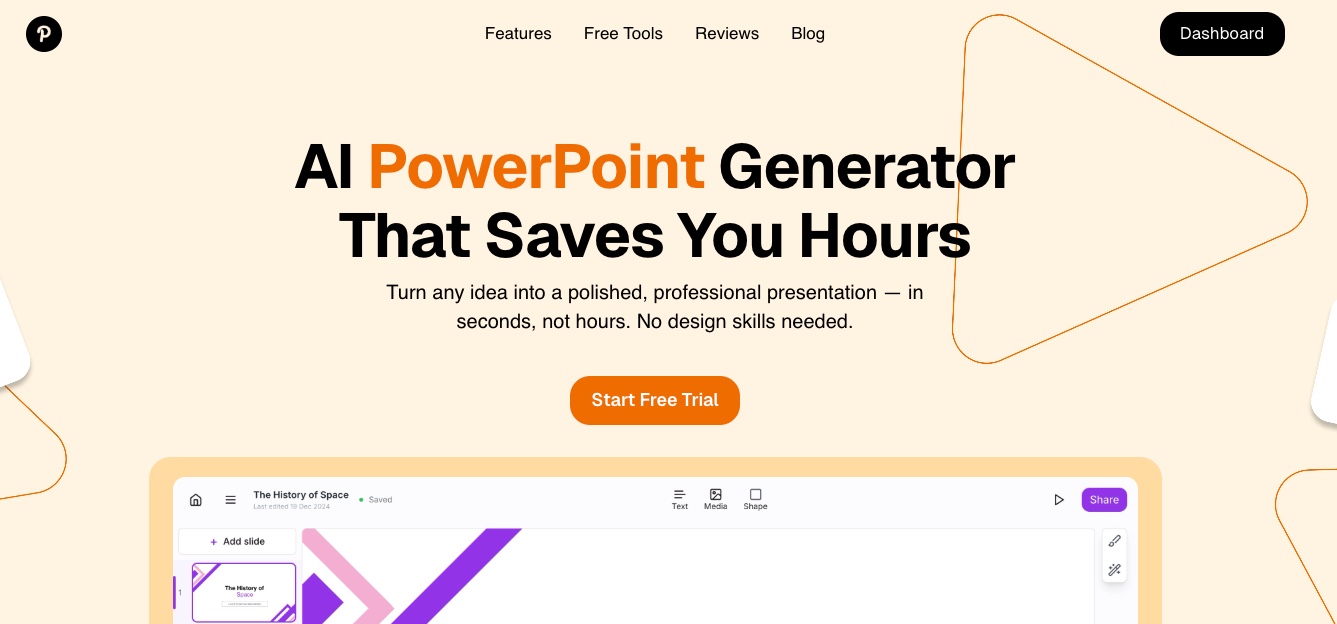
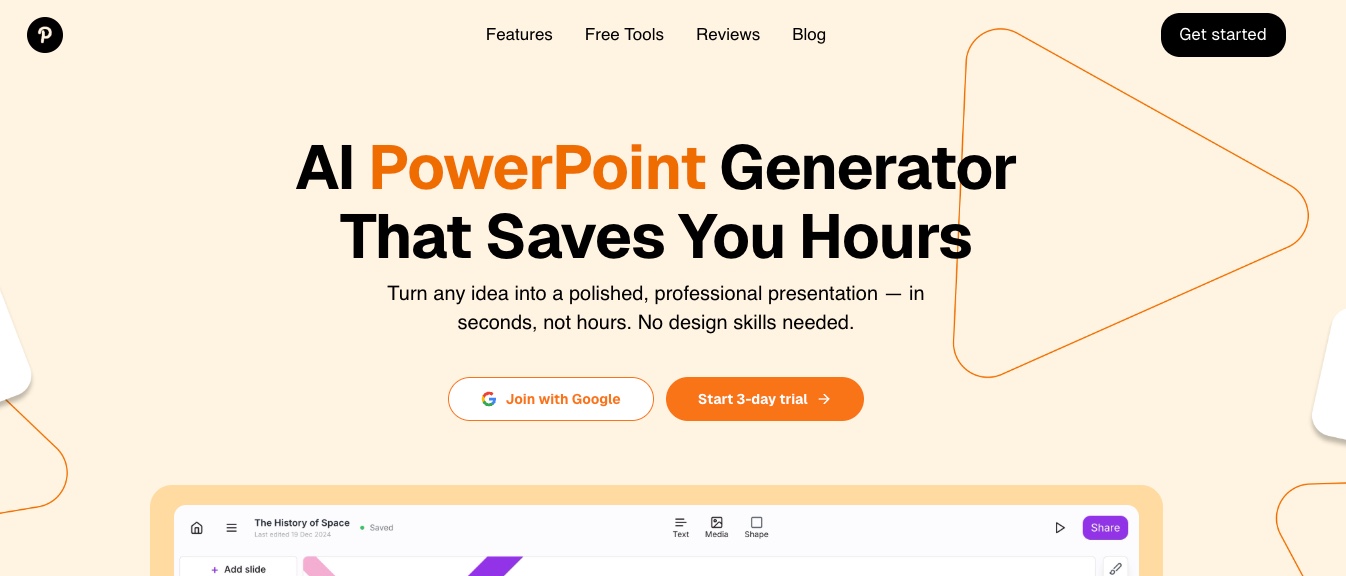
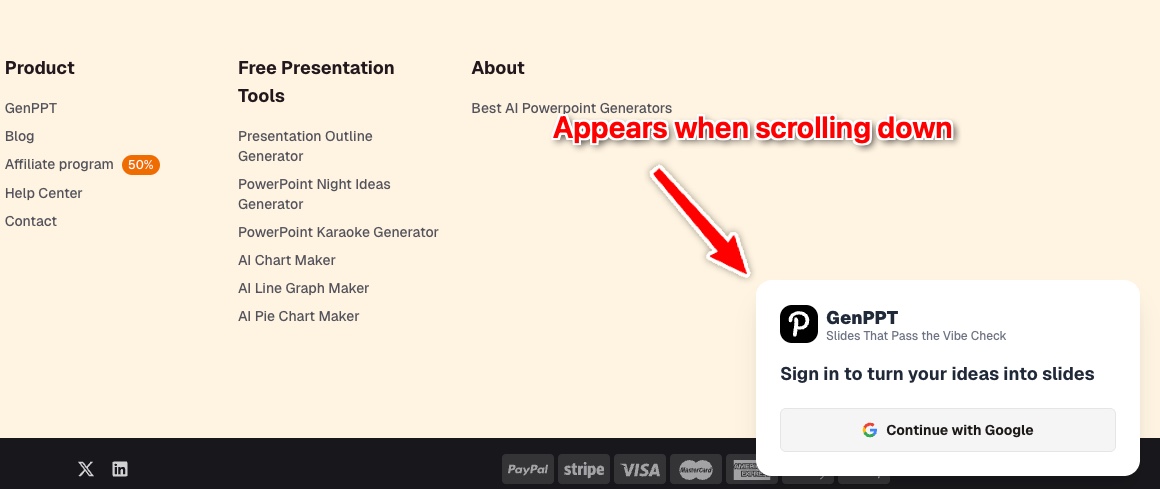
🟪 Test variant: Google CTA in the hero, plus a sticky modal
The test group saw:
- a Google Sign-In button in the hero section
- a sticky modal that appears on scroll and asks them to log in
🔍 Conversion Funnel (PostHog)
We tracked three steps:
- Pageview
- Logged in
- Landing on
/app= trial start
Conversion went from 7.48% (control) to 15.50% (test):
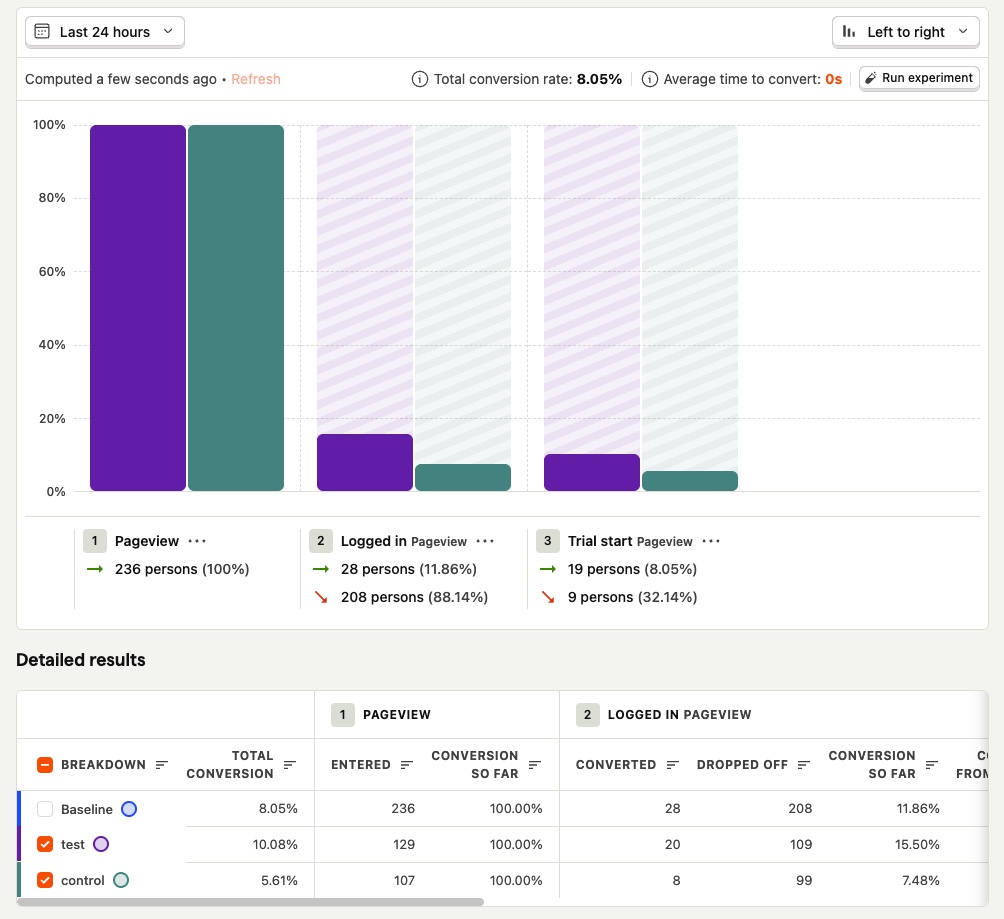
📈 With no form to fill in and the button in plain sight, trial conversion doubled: a +107% lift.
Want to set this up with Next.js, React and PostHog? Here's the full tutorial:
2. Promptwatch: 10.5% Conversion Rate with Google Sign-In
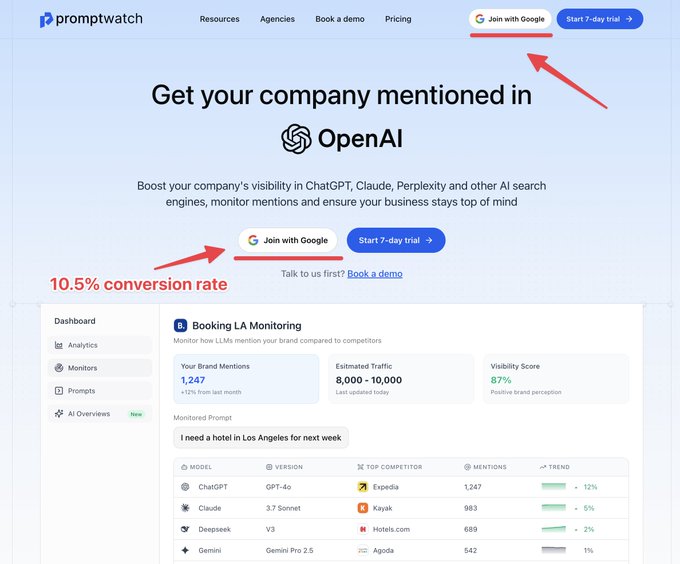
Promptwatch made "Join with Google" its main call to action, in both the navbar and the hero, placed before the "Start 7-day trial" button. That setup reportedly lifted sign-up conversion to 10.5%.
🧠 Want to see whether ChatGPT, Claude and Perplexity mention your brand? Try AISEOTracker → It tracks how your brand shows up across AI models, so you can see what to fix.
The value props and social proof all sit above the fold, so a visitor can decide without scrolling.
3. KISSmetrics: 11% to 59.7% After Adding "Log in with Google"
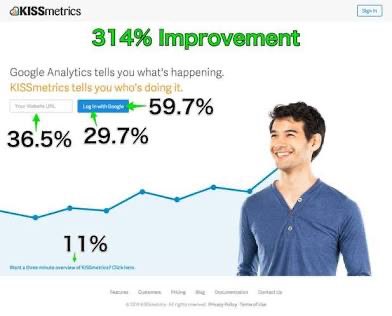
- The test: KISSmetrics reported an experiment where adding a "Log in with Google" button raised sign-up engagement from 11% to 59.7%, more than five times the baseline.
- The takeaway: make the button big and obvious. That's most of the lesson.
4. Reddit: Nearly 2× More Sign-Ups with Google + One Tap
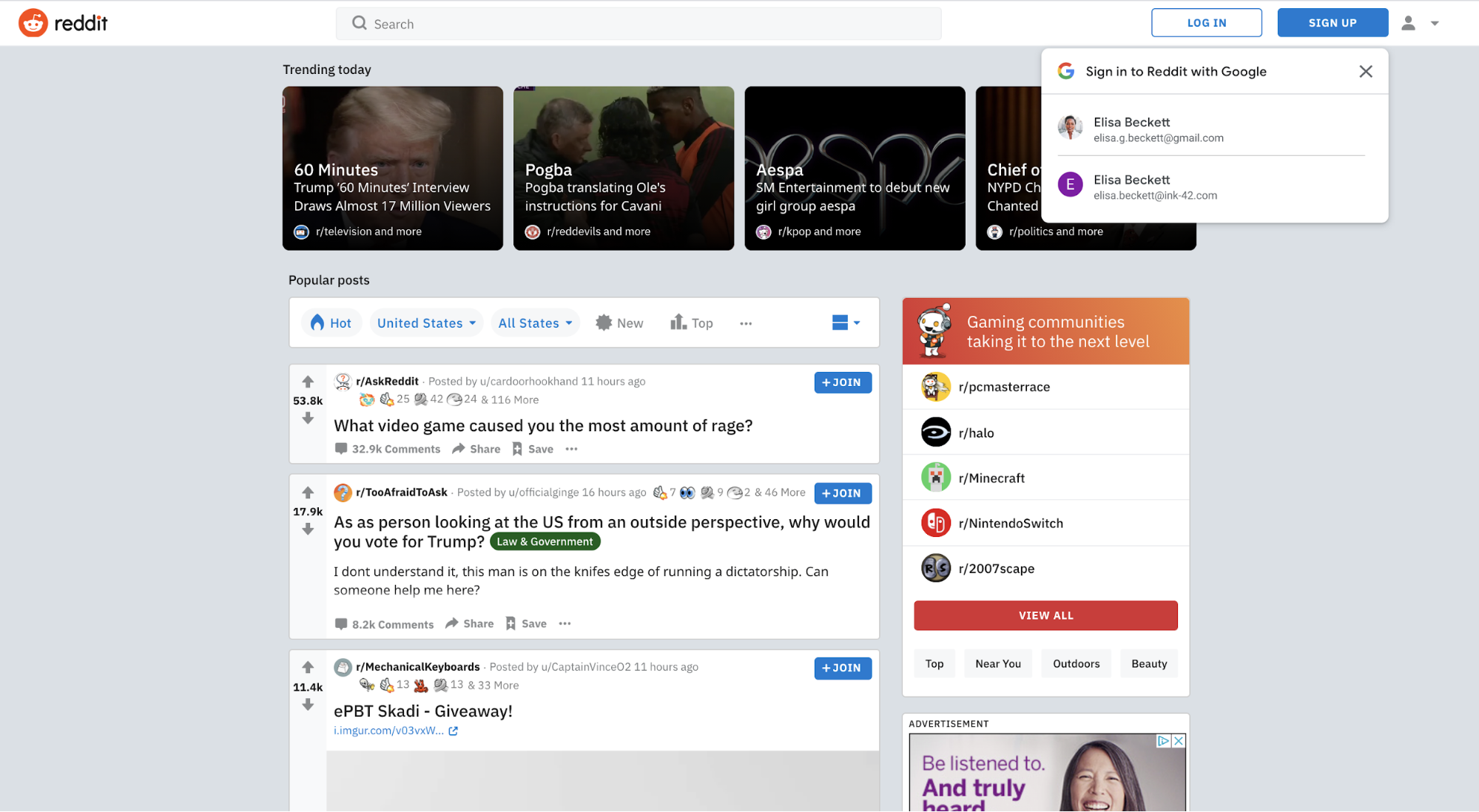
Reddit rolled this out in stages. It tested the Google button on one platform first, expanded it everywhere, then added One Tap on top. The backend work alone took about four months, and the full rollout about a year.
Impact:
- +50 to 60% sign-ups from the "Sign in with Google" button (desktop and Android)
- +90% sign-ups from One Tap (desktop)
- +100% sign-ins from One Tap for returning visitors on mobile web
- Combined: a 185% increase in platform conversion, per Google
Reddit never required an email to sign up, which made lost accounts hard to recover. Every Google sign-in comes with a verified email, so that problem shrank too.
"Sign in with Google and One Tap solutions have significantly increased account creation and email coverage for Reddit by reducing friction during the account sign up flow for users. These are critical components as we continue to improve the user experience, establish long-term relationships with our users, and drive long-term retention."
Yee Chen, Director of Product, Reddit
Source: Reddit case study by Google
5. Iron Company: 8× More Sign-Ups, 1.7× More Purchases
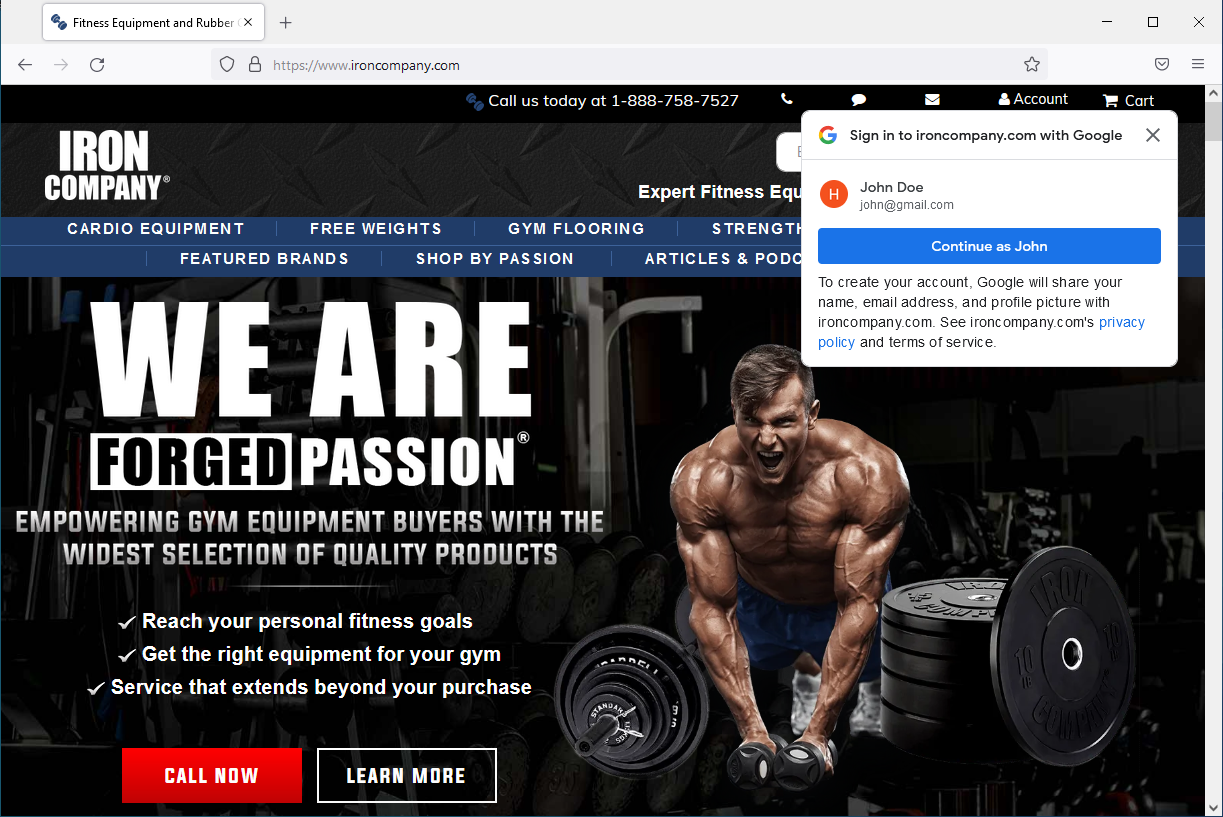
Iron Company has sold gym equipment online since 1997. Guests could already check out without an account, but they had to type their shipping and billing details on every order, and many abandoned the cart. The company turned on Google One Tap through a ready-made extension for its e-commerce platform. Setup took minutes.
Impact:
- 8× more sign-ups after launching One Tap
- 70× more sign-ups through One Tap than through their old Google button
- One Tap used 25× more often than all other social logins for new accounts
- One Tap users placed 32% of all orders, a 16% increase
- The purchase rate of signed-in customers went from 24% to 40% (1.7× more purchases)
"The return on Plumrocket Social Login Pro Extension is outstanding with almost no development effort. It helped reach key company goals providing website visitors instant access to account management and fast order placement."
J.P. Brice, President of Iron Company
Source: Iron Company case study by Google
The extra sign-ups turned into extra orders. For a shop, that's the number that matters.
6. The News Minute: 8× More Sign-Ups, +15% Subscription Revenue
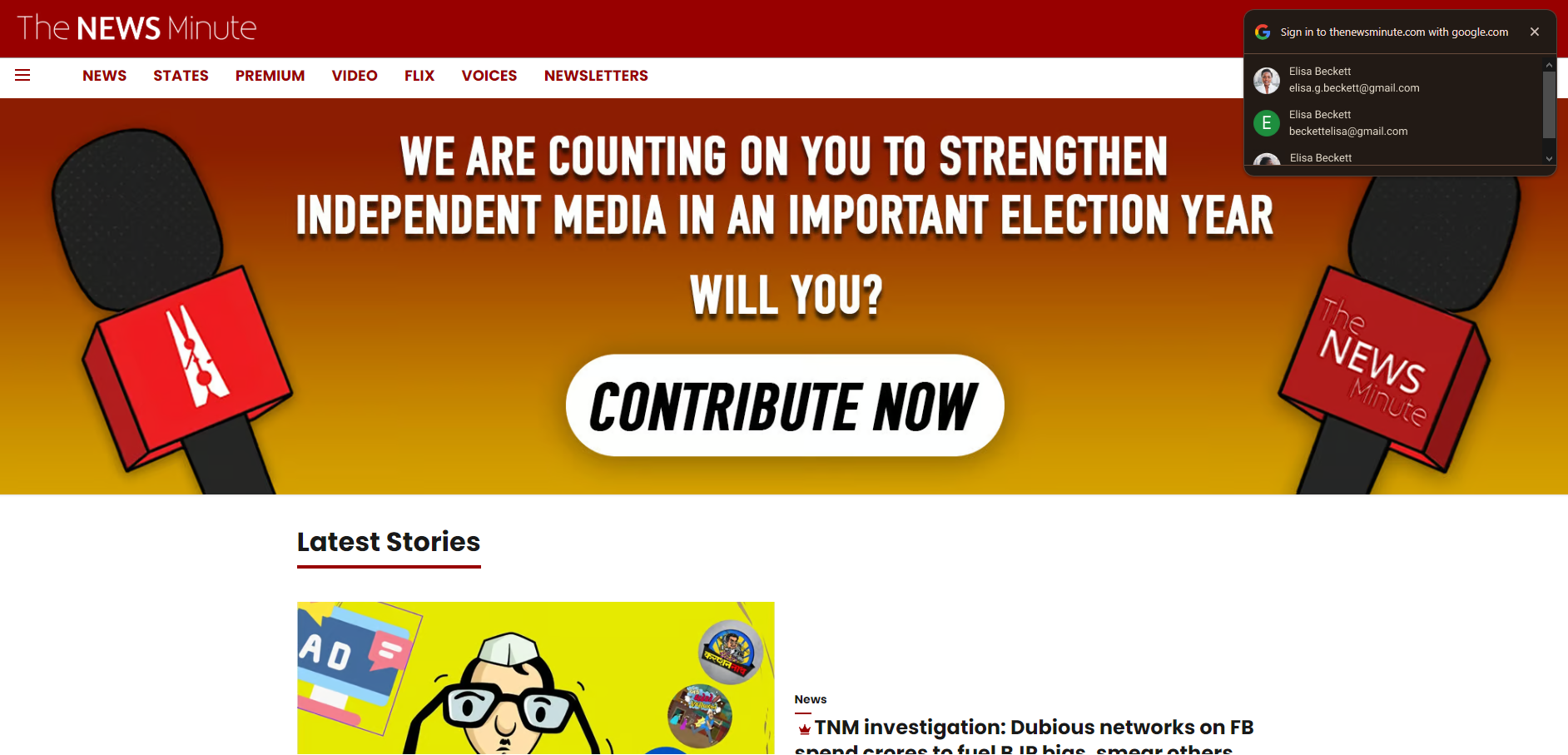
The News Minute (TNM) is a reader-funded, women-led news publisher based in Bengaluru. Its old sign-up flow asked for several fields and then made readers wait for a one-time password. Many gave up, and TNM struggled to collect emails.
A third-party developer added One Tap in about a week (the Google button took two).
Impact:
- 8× more new-user sign-ups in the first 90 days
- Almost 9× the average daily sign-ups
- Nearly 100% of new sign-ups now come through One Tap
- +15% subscription revenue in the 90 days after launch
"Google One Tap has helped us tremendously grow our logged-in user base and to welcome them on their journey with us. […] We are able to engage with a far greater number of new people. The top of our funnel has increased dramatically, and is starting to have a positive impact on the number of subscriptions we are getting."
Vignesh Vellore, CEO, The News Minute
Why it worked:
- No one-time passwords and no long form
- A login screen readers already knew
- More emails to send subscription offers to
Source: The News Minute case study by Google
Even a paywalled publisher got more paying readers once signing up took one tap.
7. Heap Benchmark: +8.2pt Signup Lift from Google OAuth
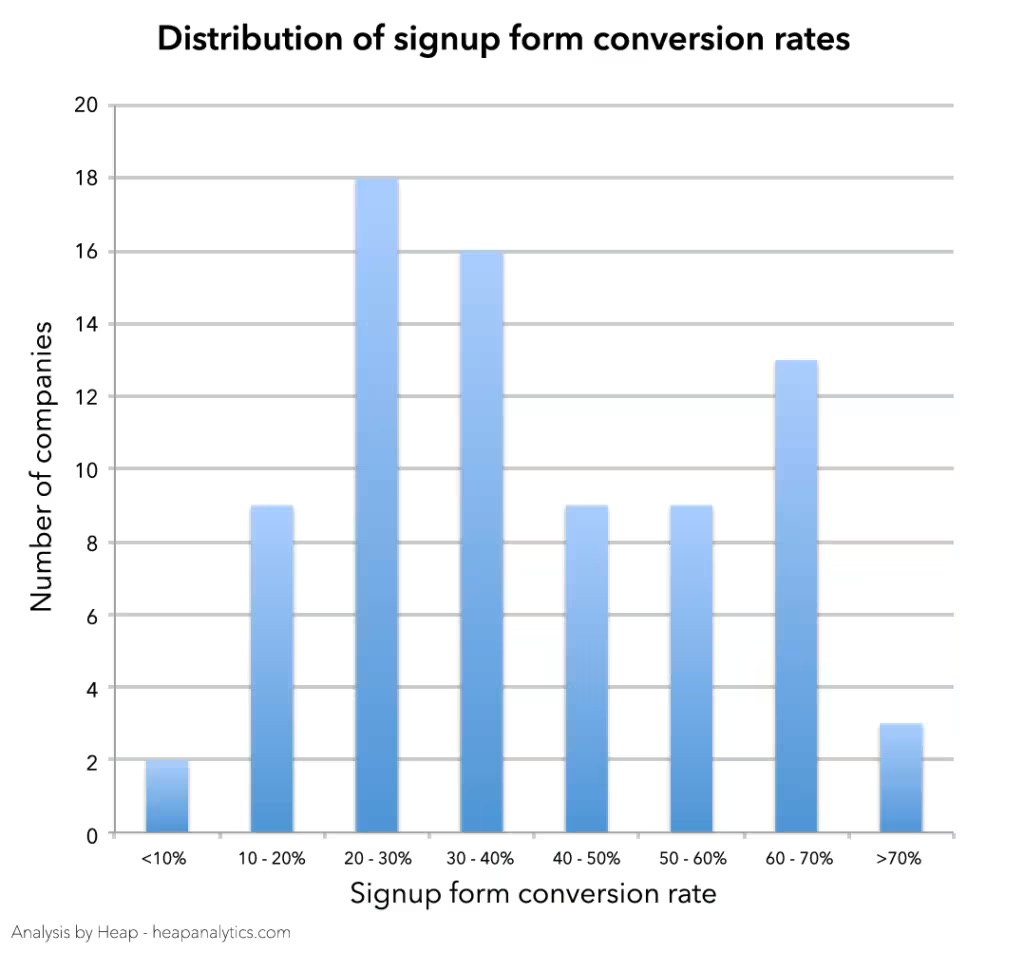
Heap's SaaS signup benchmark: Heap looked at the signup forms of 79 SaaS companies (data from November 2016 to February 2017). The average form converted 36.2% of the people who reached it. Offering one-click OAuth sign-up, usually Google, was the biggest factor they found: +8.2 percentage points.
- Extra fields like company name, job title or phone number lowered conversion.
- Companies running A/B testing software had almost double the signup rate of those that didn't.
The data is old, but it matches what Google's newer case studies and our own test show.
Source: Heap: What is a "good" conversion rate for your signup flow?
How to Add "Sign in with Google"
-
Make the Google button obvious
- Put the Sign in with Google button in your navbar, your hero and every sign-up modal, on desktop and mobile.
- For returning visitors or gated content, add the One Tap prompt too.
-
Keep the alternatives
- Leave email/password and Apple sign-in visible. Hiding them can lower total sign-ups even while Google's share goes up.
-
Measure what matters
- Primary metric: completed, verified sign-ups ÷ unique visitors.
- Secondary: activation (the first key action) and retention. Social login often lifts sign-ups more than it lifts long-term use.
-
Be clear about data
- Say what you receive ("We'll get your name and email from Google…").
- Store tokens securely and let people delete their account (GDPR/CCPA).
-
Roll it out as a test
- Run a 2-week A/B test: 50% of visitors see the new Google CTA, 50% see the old flow (or Google tucked under "More options").
- Low traffic? Use sequential or Bayesian testing so you don't call it too early.
Google's Identity Services documentation has the full integration steps and code.
Which Google Sign-In Option Should You Use?
-
You want the biggest lift and have few compliance limits: Use One Tap. Why: it prompts visitors on the page they're reading, while they're still deciding.
-
You already redesigned your hero and want a quick test: Use an inline button in the hero and nav. Why: it's easy to A/B test and fits your existing CTAs.
-
You're in fintech or health tech, or need explicit consent screens: Put Google on the login page only. Why: the main UI stays as it is, and motivated users still skip the form.
Implementation Tips
- Show the Google button in both the nav and the hero.
- Keep an email fallback. Some networks and some people block Google.
- Track every step: page view, button click, credential issued, onboarding done.
- Respect One Tap's cooldown. If you prompt too often, people dismiss it and it stops showing.
- Share before-and-after sign-up charts with your team so the result sticks.
More Resources
- Google Identity case studies: more companies and industries (e-commerce, news, classifieds) with their numbers. (Google for Developers)
- Heap's SaaS signup benchmark: the full breakdown by field count and form layout. (Heap)
- Stytch on One Tap: code for showing One Tap only after a scroll or a delay. (Stytch)


